AirDroid vs PhoneDesk: Full Comparison for Mac Users
AirDroid covers file transfer, remote control, and mirroring with a metered free tier and a subscription. PhoneDesk focuses on real desktop mode, second-monitor mode, and unmetered file transfer for a $25 one-time price.
AirDroid vs PhoneDesk: Full Comparison for Mac Users
AirDroid has been the go-to "control your Android phone from a computer" app for over a decade, and it does a lot — file transfer, remote control, screen mirroring, even parental controls and business device management under its wider product family. If you just searched "AirDroid Mac," you're probably trying to figure out whether its free tier is enough, or whether a narrower, Mac-specific tool like PhoneDesk gets you further for less.
Here's the honest answer: AirDroid does more things than PhoneDesk. PhoneDesk does a smaller set of things — desktop mode, second-monitor mode, file transfer — but does them as a native Mac app with no subscription and no bandwidth caps.
What Is AirDroid?
AirDroid Personal is a cross-platform app (Android, iOS, Windows, Mac, web) for managing your phone from a computer. Its core features are remote file transfer, remote control (viewing and operating your phone's screen from your computer), screen mirroring with recording, and device-finding tools. It connects over your local network for free, and over the internet ("remote network") on paid plans.
The free tier supports 2 Android devices, local-network file transfer with no size cap, but remote (internet) transfers are capped at 200MB of data per month and 30MB per file. Remote control only works on the local network for free. Screen mirroring and recording require a paid plan entirely.
AirDroid Personal Premium costs $3.99/month, or $29.99 billed yearly (about $2.50/month) — unlocking 3 devices, unlimited remote-network data, 1GB per file, remote control and screen mirroring over the internet, and remote find/erase.
AirDroid vs PhoneDesk: Feature Comparison
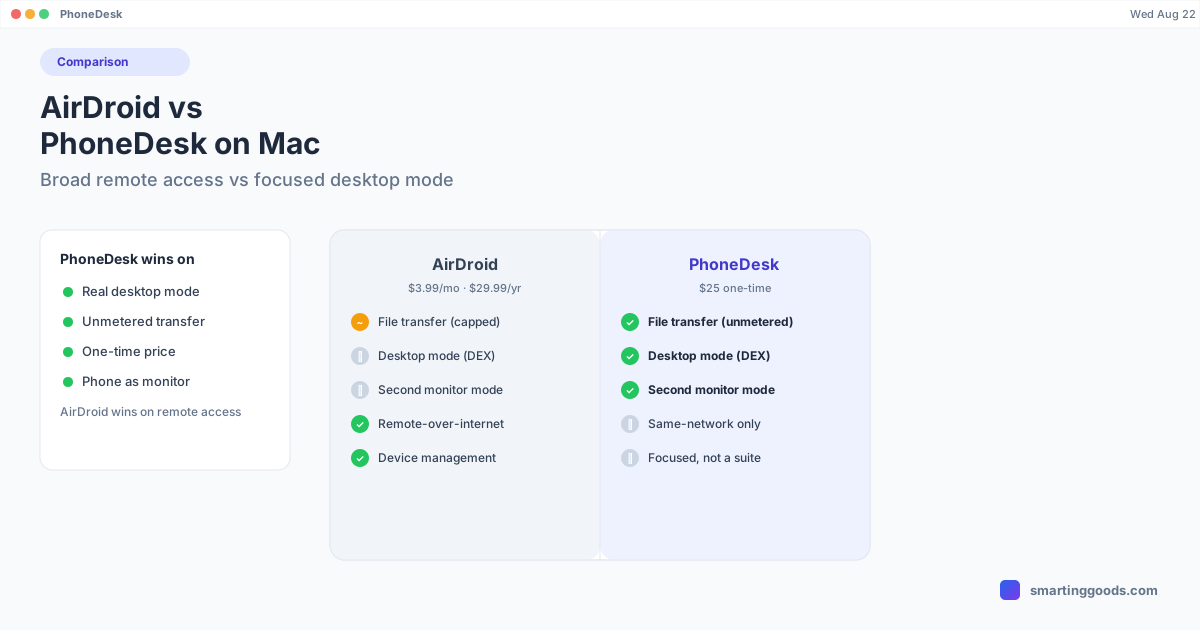
File transfer. AirDroid's free tier handles unlimited local-network transfer but throttles remote transfer to 200MB/month total. PhoneDesk's file transfer isn't metered at all — share from any app, pick files in the companion app, or drag onto the desktop-mode window, and they land in your Mac's Downloads folder. No monthly caps, no per-file size limit tied to a subscription tier.
Desktop mode. AirDroid doesn't have anything equivalent to Samsung DEX or Pixel desktop mode — it mirrors and remote-controls your phone's normal screen. PhoneDesk specifically drives your phone's own built-in desktop mode (confirmed on Samsung DEX / Galaxy Z Fold 6 and Pixel 9 Pro) as a resizable macOS window with real window management, not just a mirrored phone screen.
Phone as second monitor. This isn't something AirDroid offers — its mirroring only goes phone-to-computer. PhoneDesk can run the opposite direction: it creates a real macOS display and streams it to your phone, turning the phone into an actual arrangeable second monitor.
Screen mirroring. AirDroid gates screen mirroring and recording behind its Premium plan entirely — it's not available on the free tier at all. PhoneDesk mirrors over USB or Wi-Fi with no separate paid tier.
Remote control over the internet. This is a genuine AirDroid strength — you can reach and control your phone from anywhere with an internet connection, not just when it's near your Mac. PhoneDesk is built around your phone and Mac being on the same network or connected by cable; it's not designed as a remote-access-from-anywhere tool.
Breadth of features. AirDroid's app (and its wider product family — AirDroid Business, Parental Control, Remote Support) covers a lot more ground: device finding, remote lock/erase, camera access, call dialing from PC, and enterprise device management. PhoneDesk is intentionally narrow — desktop mode, second monitor, file transfer, mirroring — and doesn't try to be a full device-management suite.
Pricing. AirDroid Personal Premium is a recurring subscription: $3.99/month or $29.99/year. PhoneDesk is a $25 one-time purchase with no ongoing cost and a 14-day no-questions refund.
Where AirDroid Still Wins
To be fair to AirDroid: if what you actually need is to reach your phone from anywhere over the internet — not just when it's on the same Wi-Fi as your Mac — that's a real capability PhoneDesk doesn't offer. AirDroid's broader feature set (remote camera access, dialing calls from your computer, device finding, parental controls) also covers ground PhoneDesk never tries to. And if you're managing a family's or a small team's devices rather than just your own phone-to-Mac workflow, AirDroid's device-management tools are more mature.
How PhoneDesk Solves What AirDroid Doesn't
If your actual goal is a proper desktop-style workspace from your phone — not remote access to it, but Samsung DEX or Pixel desktop mode running as a real window on your Mac — AirDroid's remote-control-and-mirror model doesn't get you there. PhoneDesk auto-detects your phone as soon as USB debugging is on, and desktop mode launches with one click from the menu bar, over USB or fully wireless with QR pairing.
The second-monitor mode is also something AirDroid's feature set has no equivalent for: instead of mirroring your phone to your Mac, PhoneDesk mirrors a real macOS display to your phone. And because file transfer isn't metered or tied to a subscription tier, you're not tracking a monthly data allowance to move files back and forth.
Frequently Asked Questions
Q: Is AirDroid free? A: AirDroid has a free tier with unlimited local-network file transfer, but remote (internet) transfers are capped at 200MB/month and 30MB/file, and screen mirroring/recording require the Premium plan ($3.99/mo or $29.99/yr).
Q: Does AirDroid support Samsung DEX or Pixel desktop mode? A: No, AirDroid mirrors and remote-controls your phone's regular screen. It has no equivalent to launching your phone's built-in desktop mode as a window. PhoneDesk is built specifically for that.
Q: Can AirDroid turn my phone into a second monitor? A: No. AirDroid's mirroring goes one direction — phone to computer. PhoneDesk can also run in reverse, streaming a real Mac display to your phone so it works as a second monitor.
Q: Does PhoneDesk work over the internet, away from my Mac's network? A: No — PhoneDesk is designed for your phone and Mac being on the same Wi-Fi network or connected by cable. If you need to reach your phone from anywhere over the internet, AirDroid's remote network access covers that use case.
Q: Which is cheaper long-term, AirDroid or PhoneDesk? A: PhoneDesk's $25 one-time price is cheaper than roughly seven months of AirDroid Premium's cheapest plan, and there's no recurring charge after that. AirDroid's free tier may be enough if you don't need mirroring or heavy remote file transfer.
Bottom Line
AirDroid is the broader tool — remote access from anywhere, device management, a bigger feature list — and its free tier can cover light use. But if you're on a Mac and specifically want your phone's real desktop mode running as a window, your phone doubling as a second monitor, and unmetered file transfer, PhoneDesk is purpose-built for exactly that, without a subscription.
PhoneDesk is a $25 one-time license — no subscription, no data caps, 14-day no-questions refund. See the full feature list →