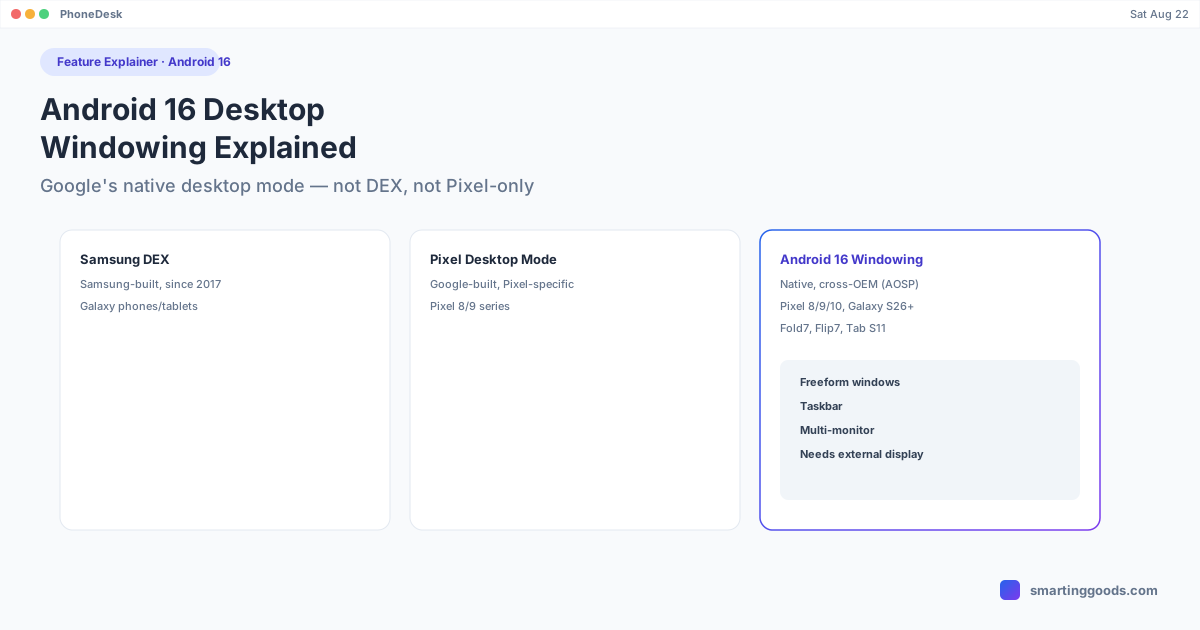
Android 16 Desktop Windowing: The Feature Explained
Android 16 added a native desktop mode built by Google, not Samsung and not Pixel-exclusive. Here's what it actually is, which devices support it, and how it differs from DEX and Pixel desktop mode.
Android 16 Desktop Windowing: The Feature Explained
Android 16 introduced desktop windowing — a native, freeform-window desktop environment built directly into the Android platform by Google, not by any single phone maker. It's easy to confuse with Samsung DEX or Pixel's earlier desktop mode preview, but it's a distinct, third thing: a cross-manufacturer feature living in Android Open Source Project (AOSP) itself, that OEMs can build on top of.
Connected display support for desktop windowing reached general availability with the Android 16 QPR3 release, after being previewed to developers earlier. It's the foundation Samsung's own DEX rebuild (in One UI 8) is now built on top of — so the two are related, but desktop windowing itself is Google's underlying framework, not a Samsung feature.
What Desktop Windowing Actually Does
When a supported Android 16 device connects to an external display, desktop windowing turns that display into a real desktop environment: freeform, resizable app windows instead of a single full-screen app, a taskbar showing pinned and recent apps, and support for connecting multiple monitors at once on devices that support it. Windows can be resized, repositioned, and used side-by-side, closer to a laptop's window management than a phone's app-switcher.
This is a meaningful shift from earlier Android multi-window modes, which were mostly split-screen or picture-in-picture. Desktop windowing behaves like an actual desktop, not a phone screen stretched wider.
Which Devices Support It
Android 16's desktop windowing requires both the OS version and hardware/OEM support — it's not automatically available on every phone running Android 16. Supported devices include the Pixel 8, 9, and 10 series, plus a range of Samsung devices including the Galaxy S26, Fold7, Flip7, and Tab S11. Older Pixels and Galaxy phones that haven't received the relevant update won't have it, even if they're technically on Android 16.
The feature activates when a supported device is connected to an external display — it's not something that changes the phone's own screen on its own.
How It Differs From Samsung DEX and Pixel Desktop Mode
The three terms get used interchangeably online, but they're not the same thing:
- Samsung DEX is Samsung's own desktop environment, built and maintained by Samsung since 2017, running on Galaxy phones and tablets. It predates Android 16 by years and, as of One UI 8, is being rebuilt on top of Android's desktop windowing framework rather than Samsung's original custom implementation.
- Pixel desktop mode refers to Google's earlier, Pixel-specific desktop mode work that showed up as a developer-option preview on Pixel devices before the feature matured into what shipped platform-wide.
- Android 16 desktop windowing is the general, cross-OEM version of that feature now built into Android itself — available on both Pixel and Samsung hardware that supports it, not tied to one manufacturer's app or skin.
In practice, if you're on a Pixel 9 or a Galaxy S26, what you're getting when you plug into a monitor is powered by this same underlying Android framework — the OEM just wraps it with their own branding and defaults.
Running Desktop Windowing on a Mac
None of Google's or Samsung's own tools give you a way to run this desktop environment as a window on a Mac — it's designed to output to an external display, and Mac support was never part of the plan. PhoneDesk fills that specific gap for supported Android phones: it connects over USB or Wi-Fi using adb, and renders desktop mode as a real, resizable window on macOS rather than requiring a dedicated monitor. Confirmed working on Samsung DEX (Galaxy Z Fold 6) and Pixel 9 Pro's desktop mode specifically — coverage of the newest QPR3-era desktop windowing on additional devices is expanding as adoption grows.
Frequently Asked Questions
Q: Is Android 16 desktop windowing the same as Samsung DEX? A: No — they're related but distinct. Desktop windowing is Google's native, cross-OEM framework; Samsung DEX is Samsung's own desktop environment, which as of One UI 8 is being rebuilt on top of that framework rather than replaced by it.
Q: Which phones support Android 16 desktop windowing? A: Confirmed support includes the Pixel 8, 9, and 10 series, plus Samsung's Galaxy S26, Fold7, Flip7, and Tab S11. Support depends on both the Android version and OEM implementation — not every Android 16 device has it.
Q: Do I need an external monitor to use it? A: Yes — desktop windowing activates when a supported device connects to an external display. It doesn't change how the phone's own screen behaves on its own.
Q: Can I run Android desktop windowing on a Mac instead of a monitor? A: Not through anything Google or Samsung ships directly. PhoneDesk is a third-party menu bar app that renders desktop mode as a window on macOS over USB or Wi-Fi, confirmed on Samsung DEX and Pixel 9 Pro desktop mode.
Get Desktop Mode Running on Your Mac
Whether it's Samsung DEX, Pixel desktop mode, or the newer Android 16 windowing framework underneath both, PhoneDesk puts it in a window on your Mac instead of requiring a monitor. See the full feature list →
PhoneDesk is a $25 one-time license — no subscription, 14-day no-questions refund.