Every Android Desktop Mode by Brand: Samsung, Pixel, Huawei, Motorola Compared
Samsung DeX, Pixel desktop mode, Huawei EMUI, and Motorola Ready For — compared side by side, with what each does well and where they all fall short on Mac.
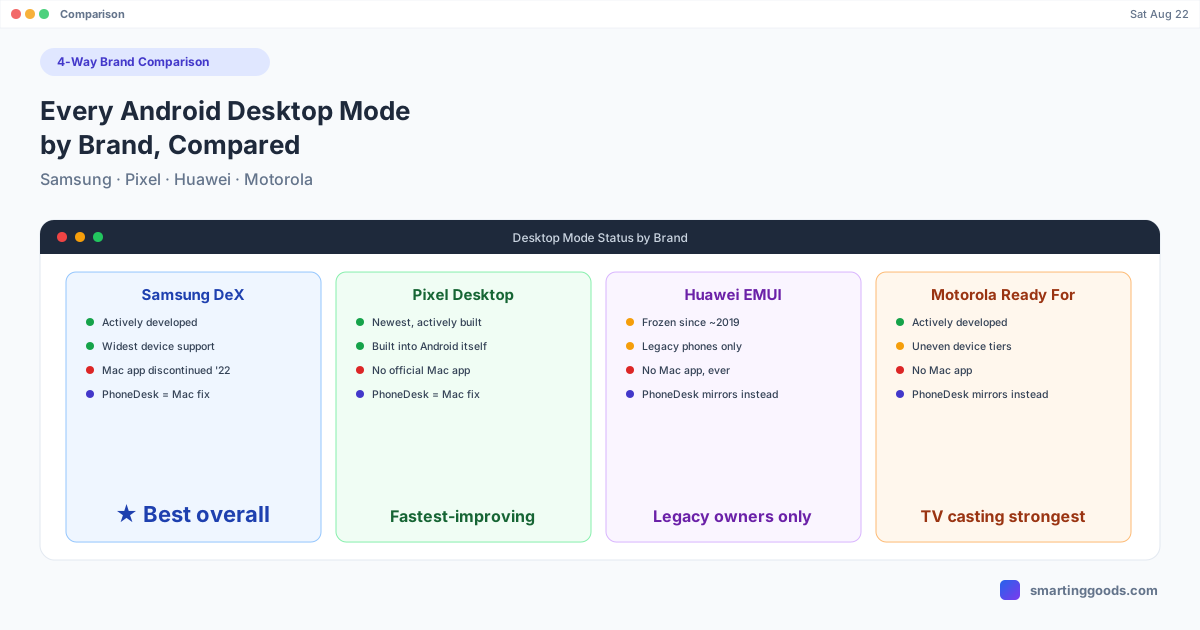
"Desktop mode" means something different depending on which phone brand made it. Samsung's version is the most polished and widely used. Google's is the newest and most actively developed. Huawei's is frozen in time. Motorola's is broader than people expect but has real gaps. If you're trying to figure out which phone (or which approach) actually gets you a usable desktop experience — especially from a Mac — here's how they all compare, side by side.
The Short Version
| Brand / Feature | Status | Needs a monitor? | Mac support | Best for |
|---|---|---|---|---|
| Samsung DeX | Actively developed | Optional (wired/wireless/PhoneDesk) | Via PhoneDesk (Samsung's own Mac app is discontinued) | Best all-around desktop mode |
| Google Pixel desktop mode | Actively developed, newer | Optional (wired/wireless/PhoneDesk) | Via PhoneDesk | Latest Android desktop features |
| Huawei EMUI Desktop Mode | Frozen since ~2019 | Yes, required | None (never built) | Legacy EMUI-era phone owners only |
| Motorola Ready For | Actively developed, narrower reach | Depends on tier (TV cast vs. wired) | None (Windows/TV only) | TV casting; wired desktop on select Edge phones only |
Samsung DeX
DeX is the most mature desktop mode on Android, available across most Galaxy S, Note, and Tab S-series devices going back to the Galaxy S8. It supports wired connection to a monitor, wireless casting to compatible TVs, and — until Samsung discontinued it in January 2022 — a dedicated Mac app that ran DeX inside a window on macOS.
That Mac app is gone, and Samsung hasn't replaced it. If you're on a Mac and want DeX without buying monitor hardware, PhoneDesk is the closest thing to what Samsung used to offer — see the full breakdown in our Samsung DeX alternative for Mac guide, or the Samsung DeX on Mac setup walkthrough if you just want the steps. If DeX has stopped connecting or freezes mid-session, our DeX troubleshooting guide covers the nine most common fixes.
Google Pixel Desktop Mode
Google's entry is the newest of the four, rolling out as a built-in Android feature on recent Pixel devices rather than a Samsung-style bolt-on. It's still maturing — window management and app compatibility are being refined release over release — but it has the advantage of being actively developed by the company that controls Android itself, which likely means it keeps improving faster than any manufacturer-specific version.
Like DeX, Pixel's desktop mode has no official Mac app. PhoneDesk covers this gap the same way — see Pixel desktop mode on Mac for the connection steps.
Huawei EMUI Desktop Mode
Huawei's Desktop Mode (Easy Projection) was a genuinely capable feature on Mate 10/20-series and P20/P30-series phones — full multi-window desktop layout, mouse and keyboard support, drag-and-drop. The problem is timing: Huawei's international phones lost Google Mobile Services in 2019 due to US sanctions, and the company's software focus shifted to HarmonyOS shortly after. Desktop Mode still works exactly as it did at launch on the phones that support it, but it hasn't been meaningfully updated since, and Huawei never built Mac software for it.
We've covered the specifics for the most-searched models: Huawei Desktop Mode (EMUI) explained, Huawei P30 Pro setup, does the Huawei P20's Desktop Mode still work, and the Huawei Mate 20 Pro walkthrough.
Motorola Ready For
Ready For is the most actively developed of the "underdog" desktop modes — Motorola keeps expanding what it covers, including newer wireless casting and PC-connection options. But its reach is uneven: the full wired desktop layout is limited mostly to higher-end Edge phones, while budget and mid-range Moto G devices typically only get TV casting, which behaves more like screen mirroring than a genuine desktop session. There's no Mac app for either tier.
Full details in Motorola Ready For: what it does and where it falls short for Mac users.
What They All Have in Common (and Where They All Fall Short)
Every brand's desktop mode was built around the same assumption: you have an external monitor, or in Motorola's case, a Miracast TV, to plug into or cast to. None of the four — Samsung, Google, Huawei, or Motorola — currently ships an official way to run their desktop mode inside a window on a Mac. Samsung used to, briefly, until January 2022. The rest never did.
That's the gap PhoneDesk was built to close, and it doesn't care which brand's desktop mode you're chasing. PhoneDesk connects to any Android phone with USB debugging enabled — Samsung, Pixel, and (for basic screen mirroring and file transfer) Huawei and Motorola phones too — over USB or Wi-Fi, and displays the phone as a resizable native window on your Mac. For Samsung DeX and Pixel desktop mode specifically, PhoneDesk drives the actual desktop-mode session, not just a mirror. It also turns your Android phone into a real second monitor for your Mac, and handles wireless file transfer in both directions — no cables, no MTP, no monitor required for any of it.
Which Desktop Mode Should You Actually Use?
If you're choosing a phone specifically for desktop mode capability in 2026, Samsung DeX and Pixel's built-in desktop mode are the two genuinely current options — both are actively developed, both have wide device support within their own lineups, and both work with a Mac through PhoneDesk without needing a monitor. Huawei's version is frozen and increasingly a legacy feature; Motorola's is broader than its reputation suggests but inconsistent across models and has no Mac path at all.
If you already own a Huawei or Motorola phone and don't want to replace it, the practical fix for Mac users isn't waiting for those brands to build Mac software — it's using a tool that works the same way regardless of brand.
Frequently Asked Questions
Q: Which Android desktop mode is the most Mac-friendly? A: None of the four brands have an official Mac app currently. Samsung DeX and Pixel desktop mode both work on Mac through PhoneDesk, which drives the actual desktop session as a window. Huawei and Motorola support screen mirroring and file transfer through PhoneDesk, but not their branded desktop-mode UI specifically.
Q: Is Huawei's Desktop Mode better or worse than Samsung DeX? A: At the time both launched, they were comparable. Since 2019, Samsung has kept iterating on DeX while Huawei's Desktop Mode has stayed frozen, so DeX is now the more capable, better-supported option.
Q: Does Motorola Ready For work like Samsung DeX? A: Only on select higher-end Edge phones with wired Ready For support — that tier is comparable to DeX's wired mode. Most Motorola phones only get the TV-casting version, which is closer to screen mirroring.
Q: What's the easiest way to get any Android phone's screen onto a Mac? A: PhoneDesk works across brands — it connects over USB or Wi-Fi to any Android phone with USB debugging enabled and mirrors it as a native Mac window, regardless of whether the phone has its own desktop mode feature.
Bottom Line
Samsung and Google are actively investing in their desktop modes; Huawei and Motorola's are either frozen or unevenly supported. None of the four currently offer a Mac app of their own. If you're a Mac user trying to get any of these phones working as a real desktop companion, that's the one problem all four brands share — and the one PhoneDesk was built to solve.
PhoneDesk is a $25 one-time license — no subscription, 14-day no-questions refund. See the full feature list →