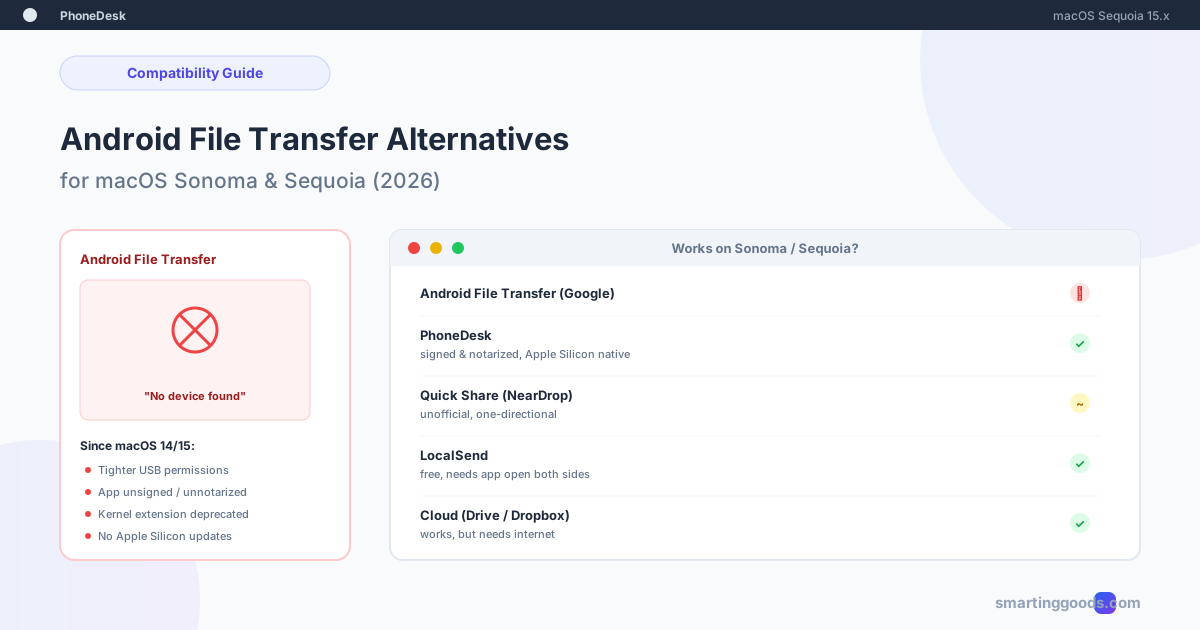
Android File Transfer Alternatives for macOS Sequoia
Android File Transfer broke after updating to macOS Sonoma or Sequoia? Here is why, and four alternatives that actually work on current macOS.
If Android File Transfer stopped working the moment you updated to macOS Sonoma or Sequoia, you're not imagining it and you didn't do anything wrong. Google's official Android File Transfer app has gone years without a meaningful update, and each recent macOS release has tightened USB device permissions, deprecated the kernel extension model AFT relies on, and made an already-fragile app noticeably worse on Apple Silicon Macs.
This isn't a "restart and try again" problem. It's a compatibility gap that isn't getting fixed, and the fix isn't waiting for Google — it's picking one of the alternatives that actually works on current macOS.
Why Android File Transfer Broke on Sonoma and Sequoia Specifically
A few specific changes in recent macOS versions hit AFT particularly hard:
Tighter USB accessory permissions. Starting with Sonoma, macOS asks for explicit approval before an app can access a connected USB device, and that approval can silently reset after updates, background app refreshes, or security setting changes — leaving AFT connected to the cable but unable to actually read the phone's storage.
Kernel extension deprecation. AFT's original device-mounting approach leans on older macOS extension APIs Apple has been phasing out since Catalina. On Apple Silicon Macs in particular, this shows up as the app launching fine but never detecting a connected device at all.
No active maintenance. Android File Transfer's last substantive update predates both Sonoma and Sequoia. It was never rebuilt against the newer USB and security frameworks introduced since — it's not that a bug appeared, it's that the platform moved and the app didn't move with it.
The result, reported consistently since these OS updates: AFT opens, shows "No device found," or connects and then drops mid-transfer on file batches that used to work fine on Ventura or Monterey.
What to Check First (Before Switching Tools)
A few things are worth ruling out before concluding it's an OS compatibility issue rather than a settings problem:
- USB mode on the phone — pull down the notification shade after connecting, tap the USB notification, and confirm it's set to "File Transfer / Android Auto," not "Charging only"
- Cable quality — some USB-C cables are charge-only and don't carry data at all; try a different cable if you have one
- System Settings → Privacy & Security — scroll down and check whether AFT needs to be explicitly allowed to run (Sonoma/Sequoia sometimes silently blocks unsigned apps here)
- Reboot both devices — sounds obvious, but a stuck USB permission state on the Mac side does sometimes clear this way
If none of that fixes it, you're dealing with the real compatibility gap, and it's time to look at an alternative.
Alternative 1: PhoneDesk — Signed, Notarized, Built for Current macOS
PhoneDesk is a macOS menu bar app built and maintained against current macOS releases specifically — it's signed and notarized by Apple (no Gatekeeper workarounds needed) and runs natively on Apple Silicon, which sidesteps the exact issues breaking AFT on Sonoma and Sequoia.
Instead of mounting your phone as a USB drive (the approach that keeps breaking), PhoneDesk pairs with your phone over USB or Wi-Fi and gives you file transfer through the Android share sheet — share a file from any app, pick "Send to Mac," and it lands in Downloads. No mount step means no MTP driver to conflict with macOS's tightened USB permissions.
It also does more than file transfer if you need it: Samsung DEX and Pixel desktop mode as a real window on your Mac, and the ability to use your phone as a second monitor. $25 one-time, no subscription, 14-day no-questions refund.
See the full file transfer feature →
Alternative 2: OpenMTP — Free, Open Source, Actively Maintained
OpenMTP is a free, open-source AFT alternative built specifically to fix the reliability problems with Google's original app. It's a native macOS app (not an Electron wrapper) with a cleaner UI and generally more stable USB handling.
Setup: download from openmtp.ganeshrvel.com, install like any Mac app, connect your phone over USB with File Transfer mode enabled.
The trade-off: it's still fundamentally MTP-over-USB, so it inherits some of the same class of USB permission friction on Sonoma/Sequoia — better than AFT, but not immune. It's also USB-only, no wireless option. Development has been more active than Google's AFT, but it's a smaller open-source project, so support and update cadence can be inconsistent.
Best for: people who specifically want a free, USB-based fix and don't mind occasional rough edges.
Alternative 3: LocalSend — Wireless, Cross-Platform, No USB Involved
LocalSend sidesteps the USB/MTP compatibility question entirely by working over Wi-Fi instead. It's a free, open-source app available for Android, macOS, Windows, and Linux.
Setup: install LocalSend on both your phone and your Mac. Both devices on the same Wi-Fi network discover each other automatically; pick a file, select the target device, and it transfers directly over the local network.
The trade-off: no share-sheet integration — you have to open the LocalSend app first and select files from within it, which is an extra step compared to a native share option. Large file transfers can also be slower to negotiate than a direct USB connection.
Best for: people who want a completely free, no-USB-dependency option and don't mind the extra app-opening step.
Alternative 4: Cloud Storage (Google Drive, Dropbox)
The universal fallback that sidesteps the entire USB/MTP compatibility question — upload from your phone, download on your Mac, works on any macOS version because it doesn't touch USB device permissions at all.
The trade-off: requires internet on both ends, uploads count against your storage quota (15GB free on Google Drive, shared with Gmail and Photos), and it's meaningfully slower than a local transfer for anything beyond a few photos — you're waiting on an upload and a download instead of one local copy.
Best for: occasional transfers, or when your Mac and phone aren't on the same network.
Comparison: Sonoma/Sequoia Compatibility
| Tool | Works on Sonoma/Sequoia | Wireless option | Share sheet | Cost |
|---|---|---|---|---|
| Android File Transfer | Unreliable / often broken | No | No | Free |
| PhoneDesk | Yes — signed, notarized, Apple Silicon native | Yes (USB or Wi-Fi) | Yes | $25 one-time |
| OpenMTP | Better than AFT, still USB/MTP-based | No | No | Free |
| LocalSend | Yes (doesn't touch USB/MTP) | Yes | No (open app first) | Free |
| Cloud storage | Yes (browser-based) | Yes (needs internet) | Yes | Free tier / paid |
Which One Should You Switch To
If Android File Transfer just stopped working after updating to Sonoma or Sequoia and you want the closest thing to "it just works again," PhoneDesk is built and tested against current macOS specifically, and it replaces the broken USB-mount approach entirely rather than patching around it.
If you want free and don't mind staying USB-only, OpenMTP is a more actively maintained alternative to AFT. If you want to skip USB and MTP entirely, LocalSend does that at no cost with a bit more manual effort per transfer. And cloud storage remains the fallback when neither device is near the other or you're moving between networks.
Frequently Asked Questions
Q: Why did Android File Transfer stop working after I updated macOS? A: Recent macOS versions (Sonoma, Sequoia) tightened USB device permissions and deprecated the kernel extension approach AFT relies on for mounting your phone as a drive. Google hasn't meaningfully updated AFT to match these changes, so the app increasingly fails to detect connected devices or drops mid-transfer.
Q: Is there an official fix from Google for Android File Transfer on Sonoma/Sequoia? A: Not currently. Android File Transfer hasn't received a substantive update in years and there's no indication a compatibility patch for recent macOS versions is coming.
Q: Does PhoneDesk avoid the same USB permission problems as Android File Transfer? A: Yes — PhoneDesk is signed, notarized, and built for current macOS, and it doesn't rely on the same USB-mount/kernel-extension approach that AFT uses, which is specifically what's failing on Sonoma and Sequoia.
Q: Can I transfer files from Android to Mac without USB at all on Sonoma/Sequoia? A: Yes — PhoneDesk, LocalSend, and cloud storage all work over Wi-Fi with no USB cable required. This also sidesteps the USB permission issues entirely since no USB device mounting happens.
Q: Is OpenMTP a safe replacement for Android File Transfer? A: It's a legitimate open-source project built specifically to improve on AFT's reliability, but it's still MTP-over-USB under the hood, so it isn't fully immune to the same class of macOS USB permission issues — it's meaningfully better, not bulletproof.
Q: Will this compatibility issue get worse with future macOS versions? A: Likely, if Google continues not updating Android File Transfer. Apple has been consistently tightening USB and kernel extension access with each release, and an unmaintained app tends to fall further behind rather than catch up.
Stop Fighting a Broken App
Android File Transfer's decline isn't a you-problem — it's an unmaintained app running into a macOS platform that's moved on without it. Rather than troubleshooting the same "No device found" error every OS update, switching to a tool built for current macOS solves it permanently.
PhoneDesk is signed, notarized, built for Sonoma and Sequoia, and works over USB or Wi-Fi with no MTP mount required — $25 one-time, no subscription, 14-day no-questions refund. See the full file transfer guide → or check out PhoneDesk →
Get PhoneDesk
Desktop mode, second monitor, and file transfer for your Mac. $25 once.
Get PhoneDesk