ApowerMirror vs PhoneDesk: Screen Mirroring Compared
ApowerMirror mirrors up to 4 devices at once with a 10-minute free session cap and a subscription. PhoneDesk drives real desktop mode and second-monitor use for a $25 one-time price. Here's the honest breakdown.
ApowerMirror vs PhoneDesk: Screen Mirroring Compared
ApowerMirror is built for one job and does it well: getting your phone's screen onto a bigger display, whether that's a Mac, a PC, or a TV, with keyboard-and-mouse control layered on top. If you're comparing it to PhoneDesk, the two apps actually solve different problems — ApowerMirror is a mirroring and presentation tool, PhoneDesk is a desktop-mode and second-monitor tool. Here's where they actually overlap and where they don't.
What Is ApowerMirror?
ApowerMirror mirrors an Android or iPhone screen to a computer or TV over Wi-Fi or USB, and lets you control the phone with your computer's mouse and keyboard once it's mirrored. It supports mirroring multiple phones to one screen at once (up to 4 devices, each in its own window on the paid tier), reverse mirroring (casting your computer's screen back to your phone), screen recording, and annotation tools aimed at presentations and remote demos. It runs on Windows, Mac, Android, iOS, and TV platforms.
The free version works over Wi-Fi and USB but limits you to mirroring one device at a time, caps sessions at 10 minutes before you have to reconnect, and tops out at 720p for iOS mirroring. The paid Premium tier removes the time cap, supports up to 4 simultaneous devices, bumps resolution up to 2K, and adds customizable keyboard controls — sold as a subscription (third-party listings put it in the neighborhood of $30/month, though you should check ApowerMirror's own checkout for the current number since we can't independently confirm an exact figure).
ApowerMirror vs PhoneDesk: Feature Comparison
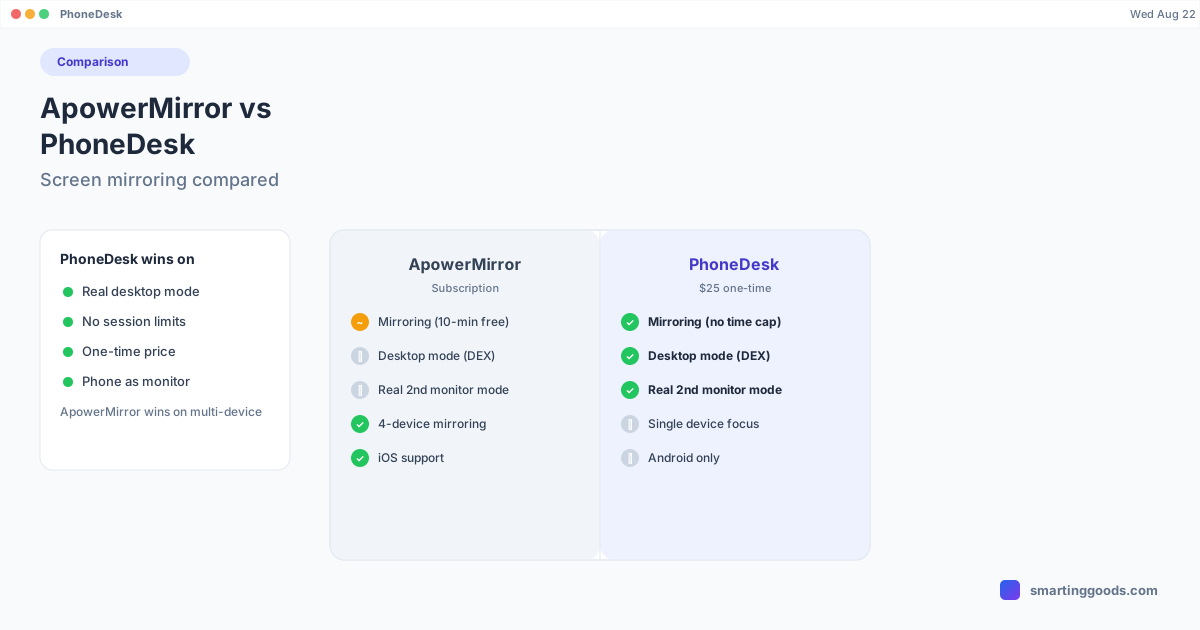
Screen mirroring. Both apps mirror a phone screen to a Mac. ApowerMirror's free tier caps sessions at 10 minutes and one device; PhoneDesk mirrors without a session timer, over USB or Wi-Fi.
Desktop mode. ApowerMirror doesn't drive Samsung DEX or Pixel desktop mode — it mirrors and lets you control the phone's normal screen, which is a different experience from a real desktop layout. PhoneDesk specifically launches your phone's built-in desktop mode (confirmed on Samsung DEX / Galaxy Z Fold 6 and the Pixel 9 Pro) as a resizable macOS window with proper window management.
Multi-device mirroring. This is a genuine ApowerMirror strength — mirroring up to 4 phones or tablets to one screen simultaneously, each in its own window, which is useful for presentations, QA testing across devices, or classroom demos. PhoneDesk is built around a single phone-to-Mac session per device and doesn't try to be a multi-device presentation tool.
Phone as second monitor. ApowerMirror's reverse mirroring casts your computer screen to your phone for viewing/presentation purposes, but it isn't built as an actual extended-desktop second monitor you drag windows onto. PhoneDesk's second-monitor mode creates a real macOS display and streams it to your phone specifically so it behaves as an arrangeable extra screen.
File transfer. ApowerMirror focuses on mirroring and control rather than file transfer as a core feature. PhoneDesk has a dedicated companion app for sending files and text from phone to Mac — share from any app, drag onto the desktop-mode window, or pick files directly, landing in Downloads with no MTP mount.
Session limits. ApowerMirror's free tier caps you at 10-minute sessions and one device — fine for a quick demo, limiting for regular use. PhoneDesk has no session time limit or device-count restriction tied to a paid tier.
Pricing. ApowerMirror Premium is a recurring subscription. PhoneDesk is a $25 one-time purchase with no ongoing cost and a 14-day no-questions refund.
Where ApowerMirror Still Wins
Being fair: if you specifically need to mirror multiple phones onto one screen at once — say, for a classroom, a QA test bench, or a live product demo — ApowerMirror's 4-device simultaneous mirroring is a real capability PhoneDesk doesn't try to match. ApowerMirror also supports iOS as well as Android, and its annotation/recording tools aimed at presenters are more developed than anything in PhoneDesk's scope. If your use case is genuinely "mirror and present," not "run desktop mode," ApowerMirror is built for that job.
How PhoneDesk Solves What ApowerMirror Doesn't
If what you actually want is your phone's desktop mode — Samsung DEX or Pixel desktop mode — running as a real window on your Mac with proper multitasking, ApowerMirror's mirror-and-control model doesn't get you there; you'd still be looking at your phone's regular mobile UI, just remotely controlled. PhoneDesk auto-detects your phone the moment USB debugging is enabled and launches desktop mode with one click from the menu bar, no session timer, over USB or fully wireless.
The second-monitor mode is also a different mechanism entirely — instead of mirroring your phone's screen outward, PhoneDesk mirrors a real macOS display onto your phone, so it functions as an actual second monitor rather than a presentation surface. And file transfer runs through a dedicated companion app rather than being a secondary feature of a mirroring tool.
Frequently Asked Questions
Q: Is ApowerMirror free? A: ApowerMirror has a free tier limited to one device, 10-minute sessions, and 720p resolution for iOS mirroring. Removing the session cap, unlocking 4-device mirroring, and 2K resolution requires the paid Premium tier.
Q: Does ApowerMirror support Samsung DEX or Pixel desktop mode? A: No — ApowerMirror mirrors and remote-controls your phone's regular screen. It doesn't launch or drive your phone's built-in desktop mode. PhoneDesk is built specifically for that.
Q: Can ApowerMirror mirror multiple phones at once? A: Yes, on the paid tier ApowerMirror can mirror up to 4 devices simultaneously to one screen, each in its own window — a feature PhoneDesk doesn't offer since it's built around single-device desktop mode and second-monitor use.
Q: Does PhoneDesk have a session time limit? A: No, PhoneDesk doesn't cap session length or restrict device count behind a paid tier. It's a flat $25 one-time purchase.
Q: Which is better for turning a phone into a second monitor, ApowerMirror or PhoneDesk? A: PhoneDesk, specifically — its second-monitor mode creates a real macOS display and streams it to your phone as an arrangeable extra screen. ApowerMirror's reverse mirroring casts your screen to your phone for viewing, not as an extended desktop you drag windows onto.
Bottom Line
ApowerMirror is the stronger choice if you need to mirror several devices at once for presentations or demos, or if you need iOS support alongside Android. But if you're on a Mac and want your phone's actual desktop mode running as a window, your phone doubling as a real second monitor, and file transfer without a session timer — PhoneDesk covers that ground for a one-time $25, not a recurring subscription.
PhoneDesk is a $25 one-time license — no subscription, no session limits, 14-day no-questions refund. See the full feature list →