How to Cast Your Phone Screen to a Laptop (2026 Guide)
A laptop can't receive a cast like a TV can. Here is the right method for every phone-and-laptop pairing — iPhone, Android, Mac, Windows — and where PhoneDesk fits for Android + Mac.
How to Cast Your Phone Screen to a Laptop (2026 Guide)
If you're trying to cast your phone screen to a laptop, the first thing to understand is that most laptops can't receive a cast out of the box. Casting protocols like Chromecast and Miracast were built to send video to a receiver — a smart TV, a streaming stick, a dongle. A laptop isn't one of those by default. So when a tutorial tells you to "just cast it," they're skipping the part where your laptop needs software that pretends to be a receiver first.
That gap is why this topic has so many conflicting answers online. The right method depends on three things: what phone you have (iPhone or Android), what laptop you have (Mac or Windows), and whether you actually want a passive video cast, a live interactive mirror, or your phone's screen doing useful work as a second display. Those are three different jobs. This guide walks through all of them, by platform, so you land on the one that actually fits your setup — including the one narrow case (Android phone, Mac laptop) where a dedicated app is worth it.
Casting vs. Mirroring vs. Screen Sharing: What's the Difference?
Casting sends a stream of specific content — a video, a tab — to a receiver, and your phone can lock or do other things while it plays. It's what Chromecast and AirPlay were designed for, and it assumes the receiving end (a TV, a speaker, a smart display) is listening for that signal.
Mirroring duplicates your entire phone screen in real time onto another display. Every tap, notification, and app switch shows up live. This is what most people actually mean when they say "cast my phone to my laptop" — they want to see and often interact with their phone screen from their computer.
Screen sharing / remote control goes a step further: not just viewing the phone's screen, but controlling it with your laptop's mouse and keyboard, or using the phone's screen as functional workspace (a second monitor, a file drop zone) rather than a passive window.
Laptops don't ship with native casting receivers the way TVs and streaming devices do — Windows and macOS both need either a built-in feature turned on (Miracast on Windows, AirPlay Receiver on macOS) or third-party software standing in as the receiver. That's the detail almost every "5 easy ways" listicle glosses over, and it's the reason the "cast to my TV" workflow you already know doesn't just carry over to a laptop.
iPhone to Laptop
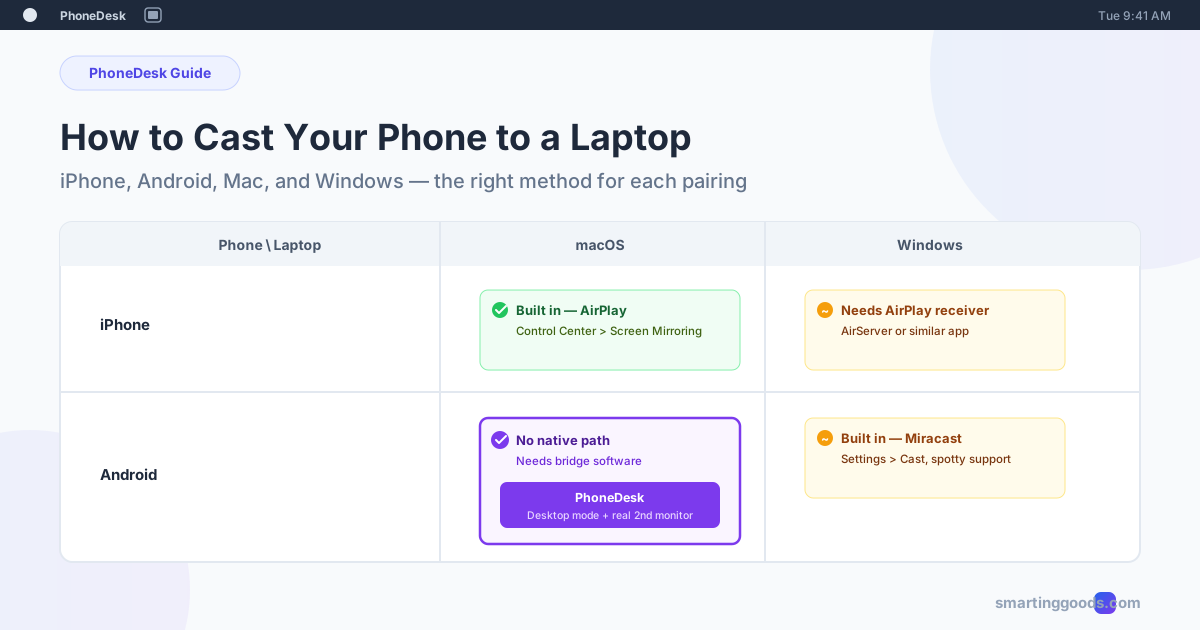
iPhone to Mac is the easiest cross-device pairing that exists, because Apple controls both ends. Open Control Center, tap Screen Mirroring, and select your Mac — as long as AirPlay Receiver is turned on in System Settings > General > AirDrop & Handoff, the connection is instant and wireless, no app required.
iPhone to Windows has no native path — Windows doesn't speak AirPlay. You'll need a third-party AirPlay receiver app (AirServer and 5KPlayer are the two most established) installed on the PC, or a cable-based option like Apple's own screen recording tools combined with QuickTime (Mac only) for a wired mirror. For Windows, expect to install something either way.
Android to Laptop
Android to Windows has a native option: Miracast, built into Windows as "Connect" (search the Start menu for it, or Settings > Bluetooth & devices > Cast). Your phone needs Miracast support too — most Android phones from the last several years have it under Settings > Connected devices > Cast. It's Wi-Fi Direct, no router required, but quality and latency vary a lot by phone manufacturer, and Samsung, in particular, buries or disables it depending on carrier.
Android to Mac is the gap nobody built for. macOS doesn't support Miracast at all, and Android doesn't speak AirPlay. This is the pairing generic "cast to laptop" advice tends to skip entirely, because the built-in options simply don't connect. If this is your setup — Android phone, Mac laptop — you need software that bridges the two protocols, and it's worth being specific about what kind you install, because most of what shows up in search results is built for one-way viewing, not for using the phone screen as real workspace.
The One Case Worth a Dedicated Tool: Android Phone + Mac Laptop
If you searched for this because you specifically have an Android phone and a Mac, the generic advice above dead-ends fast — there's no Chromecast-style built-in path, and most of the tools that fill the gap (scrcpy, Vysor, various "cast" apps) only give you a passive mirror: a window that shows your phone's screen with noticeable lag and nothing you can do with it beyond looking.
PhoneDesk was built specifically for this pairing. It runs as a lightweight macOS menu bar app and does two things generic mirroring tools don't: it drives your phone's actual desktop mode (Samsung DEX or Android's native desktop UI, depending on your device) as a real, resizable window on your Mac — not just a phone-shaped mirror — and separately, it can turn your Android phone into a genuine second monitor, with your Mac creating a real virtual display and streaming it to the phone, extending your desktop rather than duplicating it. It also handles phone-to-Mac file and text transfer over the same wireless connection, no cable, no MTP dialog.
For the full step-by-step on getting an Android phone casting to a Mac — enabling desktop mode, pairing, and what to do if the connection drops — see the dedicated Android-to-Mac casting walkthrough. If you want the broader feature rundown first, start at phonedesk.smartinggoods.com.
Frequently Asked Questions
Q: Can I cast my phone to any laptop, or does it need special hardware? A: No special hardware is needed, but your laptop does need either a built-in receiver feature turned on (Miracast on Windows, AirPlay Receiver on Mac) or receiver software installed, since laptops don't listen for cast signals by default the way smart TVs do.
Q: Why won't my Android phone cast to my Mac? A: Because the two don't share a casting protocol — macOS supports AirPlay, not Miracast, and Android phones don't speak AirPlay. This combination needs bridging software rather than a built-in setting on either side.
Q: What's the difference between casting and using my phone as a second monitor? A: Casting/mirroring shows a duplicate of your phone screen; a second monitor extends your desktop, giving you new usable screen space with different content than your laptop display. Most casting tools only do the former — PhoneDesk's second-monitor mode specifically does the latter for Android-to-Mac.
Q: Is there a free way to cast Android to Mac? A: scrcpy is free and open-source and gives you a basic interactive mirror over USB or Wi-Fi, but it doesn't drive desktop mode or turn your phone into a second display — it's a developer tool, not a polished app, and setup is command-line based.
Q: Does PhoneDesk work with iPhone or Windows? A: No — PhoneDesk is built specifically for Android phones paired with Mac laptops. If you're on iPhone, use Apple's built-in AirPlay Screen Mirroring instead; if you're on Windows, use Miracast (Android) or an AirPlay receiver app (iPhone).
Bottom Line
"Cast phone to laptop" covers at least four different pairings, and the right method depends entirely on which two devices you're actually holding. iPhone-to-Mac is built in and instant. Android-to-Windows has Miracast, with mixed reliability. iPhone-to-Windows and Android-to-Mac both need third-party software, because neither pair shares a native protocol.
If you're in that last group — Android phone, Mac laptop — and you want more than a laggy mirror, PhoneDesk is a $25 one-time license with no subscription: desktop mode as a real window, your phone as an actual second monitor, and wireless file transfer, all from the Mac menu bar. Full walkthrough and setup steps: cast Android to Mac. Complete feature list: phonedesk.smartinggoods.com.