Connect 3 Monitors to a MacBook? Phone as the Third Screen
Most MacBook chips cap out at one or two external displays. Here's exactly which Apple Silicon chips support how many monitors, and how an Android phone can fill the gap.
Can You Connect 3 Monitors to a MacBook? (Phone as the Third Screen)
You've got two external monitors, a MacBook, and a plan for a proper three-screen setup — and then macOS tells you no. Not every MacBook can drive three external displays, and the reason isn't a missing cable or a bad adapter. It's the chip.
Here's what actually limits multi-monitor support on a Mac, which models can and can't do three screens, and a workaround that uses a device you already own: your Android phone.
Why MacBooks Limit External Displays
Apple Silicon MacBooks (M1, M2, and the base M3/M4) have a hard limit on the number of external displays they can drive, baked into the chip itself — not a software restriction Apple could lift with an update.
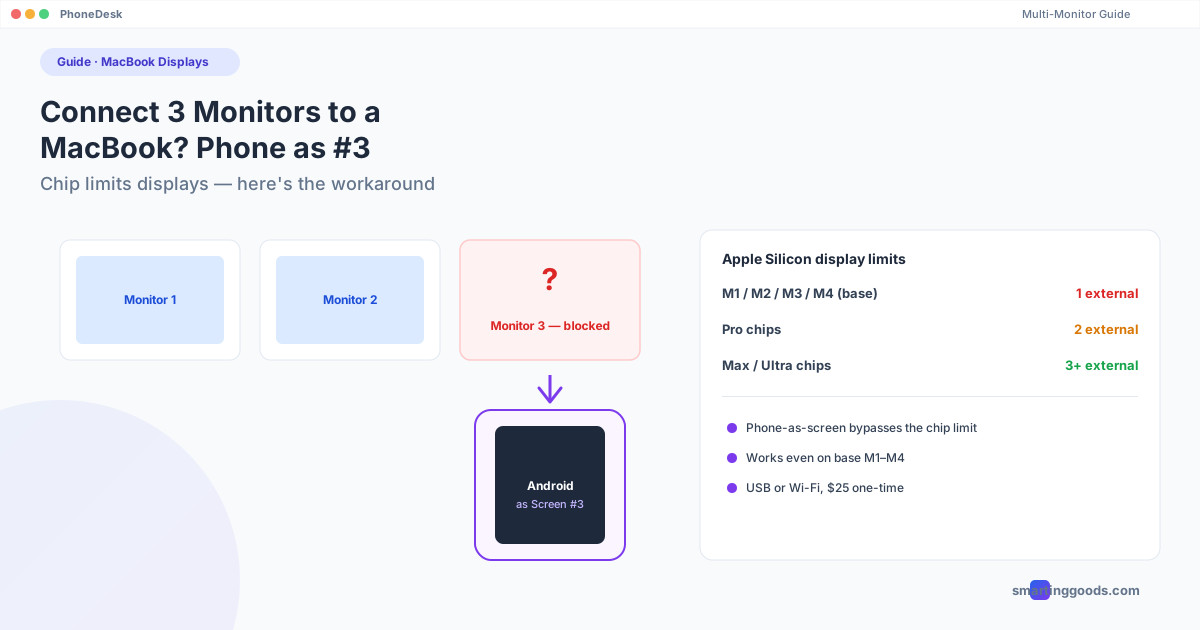
- M1, M2, M3, M4 (base chip, non-Pro/Max): 1 external display, period. This applies even to the MacBook Air and base MacBook Pro.
- M1 Pro / M2 Pro / M3 Pro / M4 Pro: 2 external displays.
- M1 Max / M2 Max / M3 Max / M4 Max and Ultra: 3+ external displays.
- Intel MacBooks (2020 and earlier): Generally more flexible — up to 2–3 externals depending on the specific GPU, sometimes more via DisplayLink adapters.
If you own a base M-series MacBook and you're trying to plug in a second external monitor, macOS will typically mirror the second display instead of extending it — and no cable, dock, or adapter changes that, because the limit is at the display-engine level in the chip, not the port.
The DisplayLink Workaround (and Its Limits)
DisplayLink adapters use software/USB tricks to add "extra" displays beyond the chip's native limit, and they do work on Apple Silicon with the right driver installed. The catch: DisplayLink displays are handled differently by macOS — think of them as a virtual/software-driven display, not a native GPU output. Performance on video-heavy or GPU-intensive work can be noticeably worse than a natively driven external monitor, and you'll need to keep the DisplayLink driver updated across macOS releases (it has occasionally broken after major macOS updates).
If your entire use case is a static window — chat, docs, a dashboard — the trade-off is fine. If you wanted a third screen for design work, video editing, or gaming, it's a bigger compromise than it sounds.
The Phone-as-Third-Screen Workaround
If you already own an Android phone, there's a simpler answer than buying a DisplayLink adapter: use the phone as your third display instead of a third physical monitor.
This works around the MacBook's display-engine limit differently than DisplayLink does — instead of tricking macOS into recognizing more physical outputs, an app like PhoneDesk creates a virtual display on the Mac side and streams it over Wi-Fi or USB to the phone, which renders it. To macOS, it behaves like a real display in System Settings → Displays — you can extend onto it, arrange it, and drag windows there.
Because it doesn't depend on the number of physical display outputs the chip supports, this approach works even on a base M1/M2/M3/M4 MacBook that's hard-capped at one external monitor. The phone becomes screen #3 (or #2, if you're on the base chip and want to add just one more) without touching the chip's actual external-display limit at all.
What it's realistically good for as a third screen:
- A chat app, ticket queue, or notifications panel
- A monitoring dashboard or stats panel
- Music/media controls
What it's not a great fit for: full-screen video editing timelines or anything demanding pixel-perfect color accuracy — a phone panel is a phone panel, not a calibrated reference monitor.
Comparing Your Options for a Third Screen on MacBook
| Approach | Cost | Works on base M1–M4? | Performance |
|---|---|---|---|
| Buy an M-series Pro/Max MacBook | $$$$ | N/A (already supports more) | Native, best |
| DisplayLink adapter + 3rd monitor | $30–80 | Yes | Software-driven, can lag on GPU-heavy tasks |
| Android phone as 3rd screen (PhoneDesk) | $25 one-time | Yes | Good for static/light content, Wi-Fi or USB |
| Mirror instead of extend | Free | Yes | Not a real 3rd workspace — just a copy |
Frequently Asked Questions
Why does my MacBook only extend to one external monitor? If you're on a base M1, M2, M3, or M4 MacBook (not Pro/Max), the chip's display engine is limited to one native external display. It's a hardware limit, not a setting you can change in macOS.
Does a dock or hub let me bypass the display limit? A standard USB-C dock or Thunderbolt hub does not bypass the chip's native display-engine limit — it just gives you more ports to plug into the same limit. Only DisplayLink-based adapters (which use a different technical approach) can add displays beyond that native cap.
Can I use my Android phone as a full third monitor for design or video work? You can extend a window onto it, but a phone-sized panel isn't a substitute for a calibrated monitor for color-critical work. It's better suited to secondary content — chat, dashboards, reference material — while your main screens handle the demanding work.
Does this work with an iPhone instead? This specific workaround (PhoneDesk) is Android-only — it doesn't support iPhone. Sidecar is Apple's built-in equivalent for using an iPad as an extra Mac display, but that's iPad, not iPhone.
Is PhoneDesk a subscription? No — $25 once, no recurring charge, with a 14-day no-questions refund if it doesn't work out for your setup.
The Short Answer
Whether you can connect 3 monitors to a MacBook depends entirely on which chip is inside it — base M-series caps out at one external display, Pro caps at two, Max supports three or more. If your MacBook is capped and buying a new machine or a DisplayLink adapter isn't appealing, an Android phone you already own can fill the gap as an extra display without touching the chip's native limit at all.
PhoneDesk is a $25 one-time license that turns your Android phone into a real, arrangeable Mac display over USB or Wi-Fi — no subscription, 14-day refund.