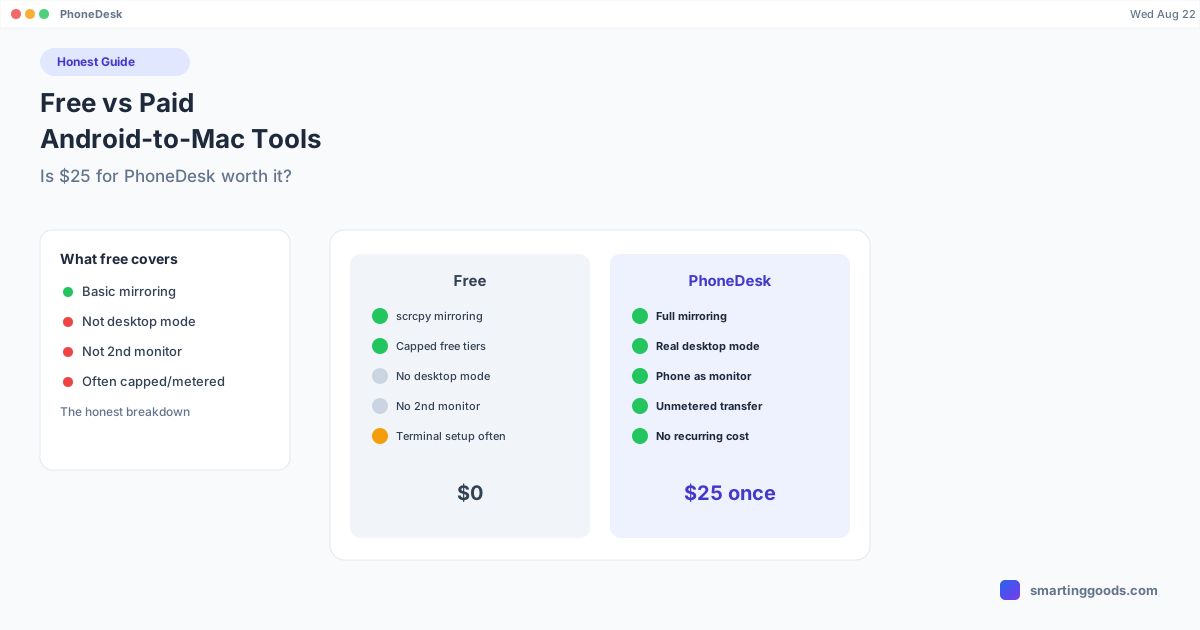
Free vs Paid Android-to-Mac Tools: Is $25 for PhoneDesk Worth It?
An honest breakdown of what free tools like scrcpy and Chrome Remote Desktop can and can't do, what subscriptions add, and where a one-time $25 purchase like PhoneDesk actually earns its price.
Free vs Paid Android-to-Mac Tools: Is It Worth Paying $25 for PhoneDesk?
Free tools for mirroring an Android phone to a Mac genuinely exist and genuinely work. So the honest question isn't "should you pay for something," it's "what does free actually get you, and where does it stop." Here's a straight breakdown — no sales spin — of what free tools can and can't do, what subscription tools add, and where a one-time $25 purchase like PhoneDesk fits between them.
What Free Tools Actually Do Well
scrcpy is the standout here — free, open-source, actively maintained, and genuinely low-latency for straight screen mirroring and control over USB or Wi-Fi. If your only need is "see and click my phone's screen from my Mac," scrcpy does that job as well as most paid tools, at zero cost. The tradeoff is setup: it's a command-line tool (installed via Homebrew), which is a real barrier if you're not comfortable in a terminal, and it doesn't drive desktop mode or turn your phone into a monitor — it only mirrors the phone's normal screen.
Chrome Remote Desktop can get you into a computer from your phone (or vice versa in limited setups) for free, backed by a Google account, with no installation beyond the browser extension. But it's built for remote desktop access between computers, not for mirroring or controlling an Android phone's own screen from a Mac — it's the wrong tool for that specific job, even though it shows up in searches for "free Android to Mac."
Free tiers of paid apps (Vysor free, AirDroid free, ApowerMirror free) typically work but come with real caps: Vysor's free tier is USB-only with ads and lower resolution; AirDroid's free tier throttles remote file transfer to 200MB/month and blocks screen mirroring entirely; ApowerMirror's free tier caps sessions at 10 minutes and one device. These aren't crippled trials — they're usable — but they're built to nudge you toward the paid tier for anything beyond occasional light use.
What Free Tools Don't Do
None of the free options above drive your phone's actual built-in desktop mode — Samsung DEX or Pixel desktop mode — as a real window with proper multitasking. They mirror your phone's regular mobile screen, which is a fundamentally different experience from a desktop-style layout with resizable app windows and a taskbar.
None of them turn your phone into a genuine second monitor either. Mirroring only moves in one direction (phone to computer); making your phone function as an actual extended display for your Mac — something you drag windows onto — needs an app built for that specific reverse-direction streaming, which the free tools in this category don't do.
What Subscription Tools Add — and What They Cost Over Time
Paid subscription tools (Vysor Pro at $2.50/mo, AirDroid Premium at $3.99/mo, ApowerMirror Premium) remove free-tier caps: unlimited session length, wireless mirroring, higher resolution, more simultaneous devices, unmetered file transfer. That's real value if you use these features constantly. But subscriptions compound — Vysor Pro's cheapest plan crosses $25 in ten months; AirDroid Premium crosses it in about six. A tool you use for years ends up costing several times a one-time purchase.
Where a One-Time $25 Purchase Fits
This is the real tradeoff: a one-time purchase like PhoneDesk costs more upfront than "free," but it's a flat $25 with no recurring charge, and it does two things none of the free or subscription mirroring tools above do — launches your phone's real desktop mode (confirmed on Samsung DEX / Galaxy Z Fold 6 and Pixel 9 Pro) as a Mac window, and turns your phone into an actual second monitor by streaming a real macOS display to it. File transfer is also unmetered, landing straight in Downloads with no MTP mount or monthly data cap.
If all you need is basic mirroring, scrcpy is free and does that well — paying $25 for PhoneDesk to just mirror your screen would be overpaying for a feature you can get at no cost elsewhere. But if you specifically want desktop mode or a phone-as-monitor setup, none of the free tools do those jobs, and PhoneDesk's one-time price beats every subscription alternative that adds them.
A Genuinely Honest Recommendation
If your phone use case is occasional, light mirroring and you're comfortable with a terminal: use scrcpy, pay nothing. If you need to reach your phone from anywhere over the internet or want broader device management: AirDroid's paid tier is reasonable for that specific job. If you need multiple phones mirrored simultaneously for demos: ApowerMirror's subscription earns its keep there. If what you actually want is desktop mode and a real second monitor from your phone, on a Mac, without a recurring charge: that's the gap PhoneDesk fills, and nothing free does it.
Frequently Asked Questions
Q: Is there a truly free way to get Samsung DEX or Pixel desktop mode running on a Mac? A: Not reliably as a real window with full window management. Free mirroring tools show your phone's normal mobile screen, not desktop mode. PhoneDesk is built specifically to launch and drive desktop mode itself.
Q: Is scrcpy better than paying for PhoneDesk? A: For pure screen mirroring, scrcpy is free and excellent — there's no reason to pay for mirroring alone. PhoneDesk is worth it specifically if you want desktop mode, a real second-monitor setup, or unmetered file transfer, none of which scrcpy does.
Q: What's the catch with free tiers of paid apps like AirDroid or Vysor? A: They're usable but capped — limited file transfer data, no screen mirroring on the free tier (AirDroid), ads and USB-only mode (Vysor), or session time limits (ApowerMirror). They're built to convert you to a paid plan for regular use.
Q: How long until a subscription costs more than PhoneDesk's $25? A: Vysor Pro's monthly plan crosses $25 in ten months; AirDroid Premium crosses it in about six months at $3.99/mo. PhoneDesk's price stays fixed at $25 with no recurring charge after that.
Q: Does PhoneDesk have a free trial? A: PhoneDesk is sold as a $25 one-time purchase with a 14-day no-questions refund, so you can try it risk-free and get your money back if it doesn't fit your workflow.
Bottom Line
Free tools aren't a trap — scrcpy in particular is a genuinely good, zero-cost option for mirroring. But "free" and "paid" aren't really competing for the same job here. If desktop mode and a real second monitor from your phone are what you're after, that capability doesn't exist for free, and a $25 one-time purchase is a fair price for it compared to any subscription that gets you partway there.
PhoneDesk is a $25 one-time license — no subscription, 14-day no-questions refund. See the full feature list →