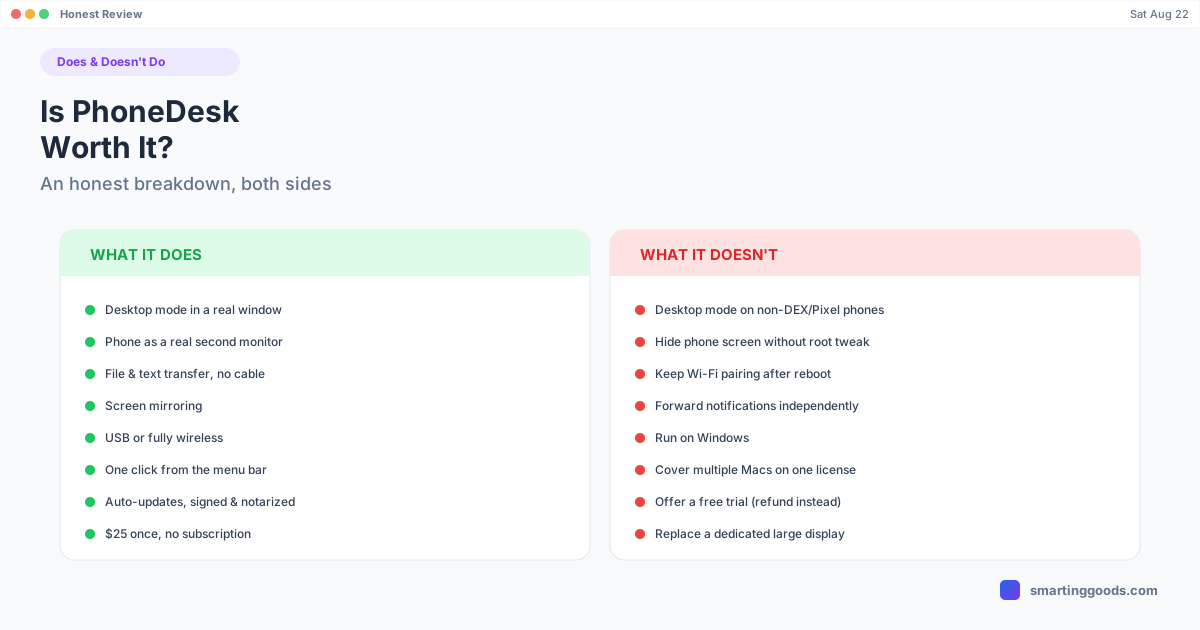
Is PhoneDesk Worth It? An Honest Breakdown
An honest, no-hype breakdown of what PhoneDesk does and doesn't do — real limitations included — so you can decide if the $25 license is worth it for your phone.
Is PhoneDesk Worth It? An Honest Breakdown of What It Does (and Doesn't) Do
$25 is a low bar, but it's still $25, and nobody wants to buy a utility app that half-works. Here's a plain accounting of what PhoneDesk actually does, what it doesn't, and who it's genuinely not built for — based only on the confirmed feature list and changelog, not marketing copy.
What PhoneDesk actually does
Four things, all confirmed and shipped:
- Desktop mode in a real window. Drives Samsung DEX (confirmed on the Galaxy Z Fold 6) and the Pixel 9 Pro's built-in desktop mode as a normal, resizable macOS window.
- Your phone as a second monitor. The reverse direction — your Mac creates a real display and streams it to your phone, which shows up in Displays settings like any other monitor. Works on Android 9+, over USB or Wi-Fi.
- File and text transfer. Share from any app, pick files in the companion app, or drag-and-drop onto the desktop-mode window. Files land in Downloads, text lands on your clipboard.
- Screen mirroring. Straightforward mirroring of the phone screen, separate from desktop mode.
All of it runs from a menu bar dropdown, over USB or Wi-Fi, with auto-discovery when you plug a phone in with USB debugging enabled.
What it costs, plainly
$25 once. Unlimited devices, one Mac. No subscription, no trial gate. 14-day no-questions refund, requested from the manage-order page or by replying to the license email.
Where it's genuinely limited — not hype
This is the part worth reading before you buy.
Desktop mode needs a specific kind of phone. Full desktop mode (the actual DEX or Pixel windowed session) only works on phones that support it natively — confirmed on Samsung DEX (Galaxy Z Fold 6) and Pixel 9 Pro. A phone without native desktop mode support will still connect for screen mirroring, but it won't get the resizable desktop window experience. Check your phone's own support for DEX or Android's desktop mode before assuming this feature applies to you.
Regular Desktop Mode isn't invisible on the phone. While a desktop-mode session is running, the phone's own screen shows a small overlay — that's a trade-off Android itself requires for a desk-eligible display, not a PhoneDesk limitation, but it means the phone isn't fully "hidden" during a session unless you use the separate invisible virtual-display variant, which needs one root device property flipped first. That's a real extra step, not something most people will do casually.
Wi-Fi pairing doesn't survive a phone reboot. Android drops the Wi-Fi adb connection every time the phone restarts. You'll reconnect over USB once, or re-pair wirelessly with a QR code, and it holds until the next reboot. If your phone reboots often, this is a recurring small step, not a one-time setup.
Second-display picture quality depends on your connection. USB gives the most bandwidth for a sharp image; Wi-Fi automatically drops resolution and bitrate to stay smooth. It's genuinely usable on both, but it's not identical to a wired connection, and it's not going to match a dedicated monitor's native resolution.
Notifications and phone functions aren't independently forwarded. PhoneDesk streams whatever's on the phone's screen or handles the specific transfer/display actions it's built for — it isn't a general phone-mirroring-plus-notification-management suite. What you see is what's actually happening on the device.
It's a Mac-only, single-Mac license. The license is scoped to one Mac (unlimited phones on that Mac), not one account usable across multiple computers. If you regularly switch between two Macs, that's worth knowing going in.
Newer, more advanced features are recent additions. Second-monitor mode, keyboard-and-mouse-only control, and seamless cursor movement between phone and Mac all shipped within the last several weeks based on the app's own changelog — they work, but they're less battle-tested than the original desktop-mode feature that's been stable since the 1.0 release.
Who it's actually a good fit for
People who already own a DEX-eligible Samsung phone or a Pixel with desktop mode and want that session usable on their Mac without a separate monitor or dock. People who want occasional extra screen space without buying hardware. People who are tired of dragging cables or opening a separate app just to move a file or a screenshot from their phone.
Who should probably skip it
Anyone whose phone doesn't support native desktop mode and who was specifically hoping for the DEX/Pixel windowed experience — mirroring will work, but not the desktop session itself. Anyone who needs a second display for hours of heavy daily work, where a dedicated monitor's larger size, higher native resolution, and lack of any dependency on phone battery or Wi-Fi stability will hold up better. Anyone on Windows — this is a macOS-only app.
Is It Worth $25?
If your phone supports desktop mode, or you just want to try phone-as-second-monitor without buying hardware, $25 with a 14-day refund is a low-risk way to answer that for yourself. Read the full feature list on the PhoneDesk page →
Frequently Asked Questions
Q: Does PhoneDesk work with any Android phone? A: Any Android phone with USB debugging enabled will connect for screen mirroring. Full desktop mode specifically requires DEX or Pixel-style native desktop support — confirmed on Galaxy Z Fold 6 and Pixel 9 Pro.
Q: Is there a free trial? A: No — PhoneDesk is fully gated until a license is activated. Instead of a trial, it has a 14-day no-questions refund, which functions as a way to try it risk-free.
Q: What don't I get with PhoneDesk that I might expect from other tools? A: It doesn't forward notifications independently, doesn't run on Windows, and its invisible (no phone-screen overlay) mode requires a root device property change rather than working out of the box.
Q: Is PhoneDesk actively maintained? A: Yes — the changelog shows regular releases, including recent additions like keyboard-and-mouse control on the phone's own screen and multi-phone cursor movement, plus reliability fixes for wireless pairing.
Q: What if I buy it and it turns out my phone isn't fully supported? A: Request a refund within 14 days from the manage-order page — no explanation required.
Try It, Risk-Free
PhoneDesk is $25 one-time, with a 14-day no-questions refund if it's not the right fit. See the full feature list →