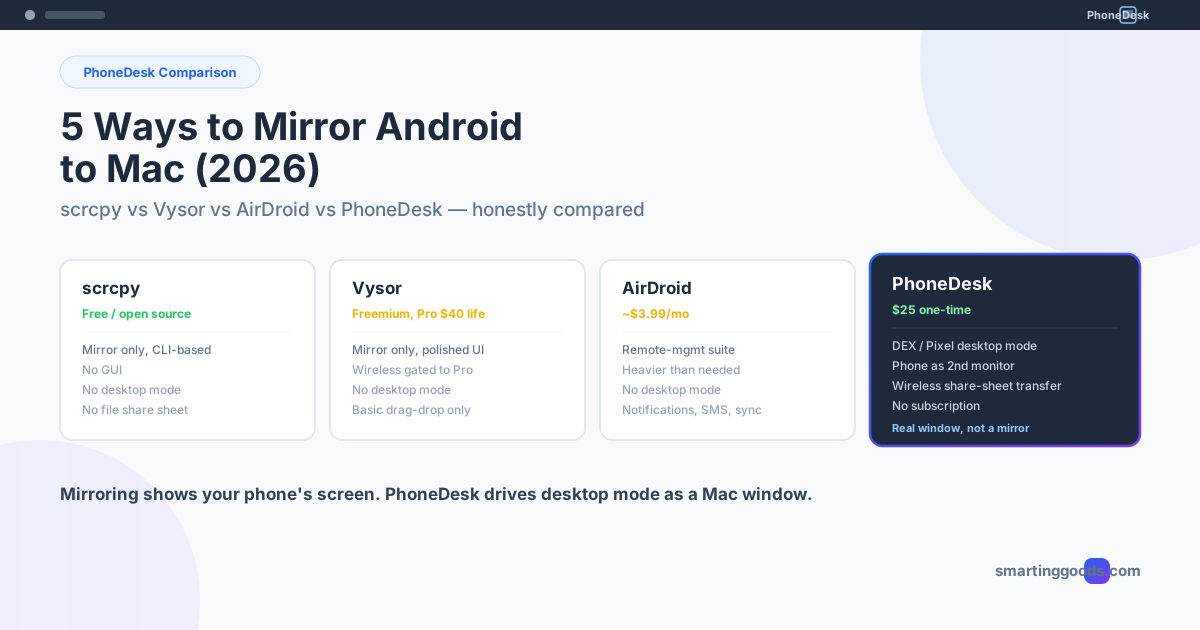
5 Ways to Mirror or Control Your Android Phone from a Mac (2026)
scrcpy, Vysor, AirDroid, and PhoneDesk compared honestly — which one actually mirrors your Android phone to Mac, and which one drives Samsung DEX or Pixel desktop mode as a real window instead.
5 Ways to Mirror or Control Your Android Phone from a Mac (2026)
The fastest free way to mirror an Android phone to a Mac is scrcpy: turn on USB debugging on the phone, plug it in, run brew install scrcpy, then type scrcpy in Terminal. If you want a clickable app instead of Terminal, Vysor and AirDroid do mirroring with a GUI, and if you want Samsung DeX or Pixel desktop mode in a Mac window rather than a mirror of the phone screen, that's PhoneDesk.
| Tool | Price | Mirrors the phone screen | Drives DeX / desktop mode | Phone as Mac second monitor |
|---|---|---|---|---|
| scrcpy | Free, open source | Yes | No | No |
| Vysor | Free tier; Pro $2.50/month, $10/year or $40 lifetime | Yes | No | No |
| AirDroid | Free tier; Personal around $3.99/month | Yes | No | No |
| PhoneDesk | $25 one-time | Yes, in a window you can control | Yes | Yes |
"Mirroring" is actually three different problems wearing one label: seeing your phone's screen on your Mac, using your phone's screen as extra desktop space, and moving files between the two devices without a cable. Some tools solve one of those well. None of the mirroring-first tools solve all three, because mirroring and desktop mode are architecturally different things: one streams a view of the phone, the other drives the phone's own desktop UI (Samsung DEX or Android's native desktop mode) as if it were a Mac window.
Here's an honest breakdown of the five real options in 2026, including where each one runs out of road.
What Is Android-to-Mac Mirroring, Actually?
"Mirroring" means your Mac displays a live video feed of your Android phone's screen, usually with mouse/keyboard control passed back to the phone. Apple never built this — there's no first-party bridge between Android and macOS the way there is between iPhone and Mac (Continuity, AirDrop, Universal Clipboard). Every tool on this list exists to fill that gap Google and Apple left open.
The tools split into two camps. Screen mirroring apps (scrcpy, Vysor, most of AirDroid, most listicle picks like ApowerMirror or LetsView) show you a window with your phone's normal mobile UI in it — same cramped layout, just projected onto a bigger screen. Desktop mode drivers are different: they launch the phone's actual desktop interface — Samsung DEX on Galaxy devices, or Android's native desktop mode on Pixel and other Android 10+ phones — and put that in a resizable Mac window. That distinction matters more than most comparisons let on, and it's why we've broken out five tools instead of three.
scrcpy — Free, Open Source, and Genuinely Excellent at One Thing
scrcpy (pronounced "screen copy") is the tool most developers reach for first, and for good reason. It's completely free, open source, installs in one line via Homebrew (brew install scrcpy), and delivers real performance — 30-60fps, sub-100ms latency, 1080p or higher. It works over USB or Wi-Fi and requires no app installed on the phone itself.
The catch: scrcpy is a command-line tool with a bare mirror window, not a product. There's no GUI to click through, no settings panel — you pass flags at launch (--max-size, --bit-rate, --window-title) to configure it. That's a feature if you're comfortable in Terminal and want a scriptable, zero-cost mirror. It's a wall if you're not.
More importantly for anyone searching this keyword because they want more than a mirror: scrcpy has no concept of desktop mode. It can't launch Samsung DEX or Pixel's desktop UI — it just mirrors whatever's on the phone's normal screen, rotated or not. And it has no file-transfer layer beyond basic drag-and-drop of individual files during a mirror session — no share-sheet integration, no "send this photo from my phone" workflow.
Best for: developers and power users who want free, scriptable mirroring and don't need desktop mode or file transfer.
Vysor — The Familiar Freemium Mirror
Vysor has been around long enough that it's often the first result people click. The free tier gives you basic mirroring and control, capped at lower quality. Vysor Pro — $2.50/month, $10/year, or $40 lifetime — unlocks full-screen mode, wireless mirroring, drag-and-drop file transfer, and "Vysor Share," which lets you hand off your device to someone remotely via a link.
Vysor is polished and easy to set up (browser extension or native app), which is why it shows up in almost every "best Android mirroring app" list. But it's still a mirror, not a desktop driver — you're looking at the same mobile layout, just bigger. And several of the features people actually want (wireless mode, real file transfer) sit behind that $40 lifetime paywall, which is worth knowing before you install it expecting the free version to cover everything.
Best for: casual mirroring with a clean UI, if you're fine paying for wireless and file transfer.
AirDroid — A Remote-Management Suite, Not a Mirroring App
AirDroid gets lumped into mirroring comparisons because screen mirroring is one of its features, but that undersells (or oversells, depending on your need) what it actually is. AirDroid Personal (around $3.99/month) is built for remotely managing a device — reading notifications, sending texts, transferring files across Android/iOS/Windows/Mac, and mirroring the screen as one feature among many. The free tier is limited to basic transfer and short mirroring sessions; stable remote control and higher-quality projection require the paid plan.
If what you actually want is "drive my phone from my Mac like a remote-support tool," AirDroid is built for that. If what you want is "put my phone's desktop mode in a window" or "get files off my phone without digging through a cross-platform sync app," AirDroid is heavier than it needs to be — you're paying for (and running) a much bigger feature set than the job requires.
Best for: people who want broad remote access to their phone (notifications, SMS, multi-device file sync), not specifically desktop mode or monitor use.
The Overlooked Option: ApowerMirror, LetsView, and the Rest
Most roundups also mention ApowerMirror, LetsView, AnyViewer, or PigeonCast. They're worth a one-line note: these are generally wireless-first mirroring tools aimed at casual use (watching phone video on a bigger screen, presenting a phone screen in a meeting) rather than daily-driver productivity. They compete directly with Vysor's free tier — same category, same limitation. None of them touch desktop mode or two-way file transfer with the depth this list is about, so we won't spend more time on them here.
PhoneDesk — Built for Desktop Mode and Monitor Use, Not Just Mirroring
PhoneDesk isn't trying to out-mirror scrcpy — it's solving a different problem than any tool above. If you own a Samsung Galaxy or a Pixel and want to actually use your phone's desktop mode on your Mac (not just look at its mobile screen), none of the four tools above do that. scrcpy mirrors the phone's normal UI. Vysor mirrors the phone's normal UI. AirDroid mirrors the phone's normal UI. Samsung and Google never shipped a Mac client for DEX or Pixel desktop mode at all — that gap is exactly what PhoneDesk exists to close.
PhoneDesk is a macOS menu bar utility with three specific jobs:
- Desktop mode as a real Mac window — launches Samsung DEX or Pixel/Android 10+ desktop mode and drives it as a resizable window on your Mac, not a mirrored phone screen.
- Phone as a second monitor — runs the direction none of the above tools run at all: your Mac creates a virtual display and streams it to your phone, turning the phone into genuine extra screen real estate.
- Wireless file transfer — send files or text from phone to Mac using the native Android share sheet. No MTP, no cable, no separate sync app.
It's a $25 one-time license — no subscription, no Pro tier gating half the features behind a paywall the way Vysor does. If your goal is specifically desktop mode or using your phone as a monitor, see the full feature breakdown or check out how the second-monitor mode works in detail on the phone-as-second-monitor guide.
Frequently Asked Questions
Q: What's the best free way to mirror Android to Mac? A: scrcpy is the strongest free option — open source, no ads, no account, and genuinely low latency. The tradeoff is a command-line interface with no GUI, so it suits people comfortable typing flags in Terminal more than someone who wants to click a button and go.
Q: Is Vysor safe and worth paying for? A: Vysor is a long-standing, widely used tool and generally considered safe. Whether it's "worth it" depends on which features you need — the free tier is genuinely limited, and wireless mode plus file transfer sit behind the $40 lifetime (or $2.50/month) Pro tier.
Q: Can scrcpy or Vysor launch Samsung DEX or Pixel desktop mode on a Mac? A: No. Both tools mirror the phone's standard mobile screen — they don't launch or drive the phone's separate desktop-mode interface. Samsung and Google have never shipped an official Mac client for DEX or Pixel desktop mode, which is the specific gap PhoneDesk was built to fill.
Q: What's the difference between screen mirroring and using a phone as a second monitor? A: Mirroring duplicates your phone's screen onto your Mac — same content, two displays. Using your phone as a second monitor runs the opposite direction: your Mac generates a new virtual display and streams it to the phone, giving you genuine extra desktop space rather than a copy of what's already on the phone. PhoneDesk supports the second-monitor direction; the mirroring tools above do not.
Q: Does AirDroid replace the need for a mirroring app? A: It can, if what you want is broad phone-to-computer access — notifications, texts, file sync, occasional mirroring. It's not built specifically for desktop mode or continuous monitor use, so if that's your actual goal, a purpose-built tool will fit better than a general remote-access suite.
Which One Should You Actually Install?
If you want free and don't mind the command line: scrcpy. If you want a polished mirror and don't mind paying for the full feature set: Vysor. If you want broader remote device management: AirDroid. If what you actually searched for was a way to run Samsung DEX or Pixel desktop mode on your Mac, or turn your phone into a real second monitor, none of those three do that job — that's what PhoneDesk was built for.
PhoneDesk is a $25 one-time license, no subscription, with a 14-day no-questions refund if it doesn't fit your setup. See the full feature list →