One UI 7 Desktop Mode: What Changed for Samsung DEX
One UI 7 quietly dropped a major DEX feature and pushed a replacement most people didn't ask for. Here's exactly what changed, what didn't, and what's coming next in One UI 8.
One UI 7 Desktop Mode: What Changed for Samsung DEX
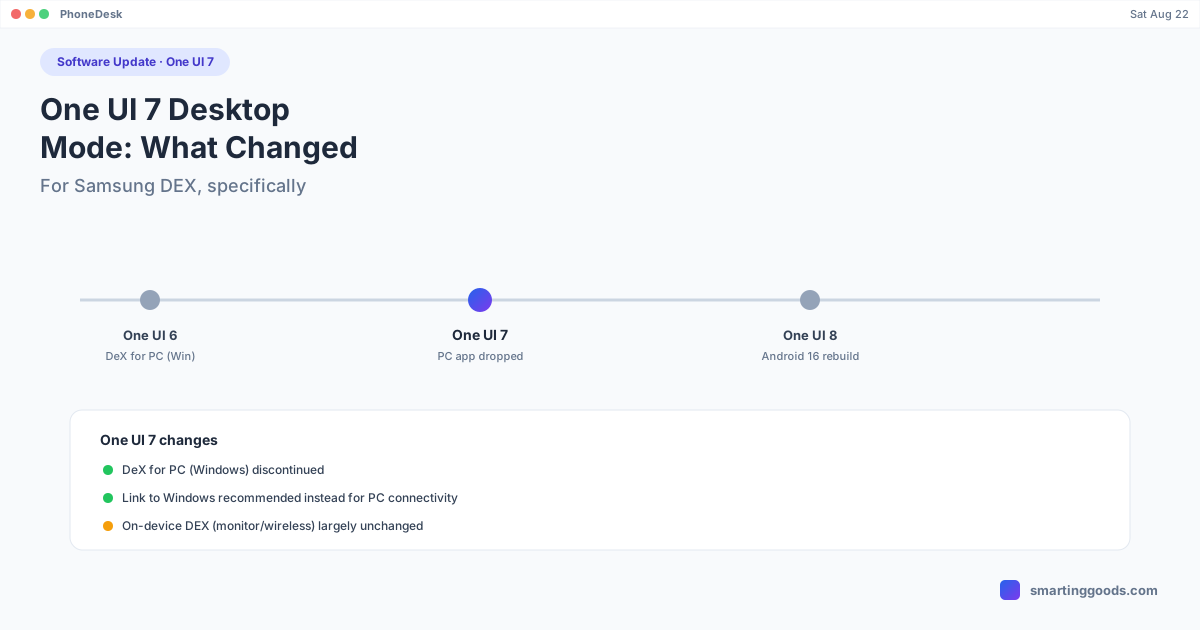
One UI 7 (Android 15) shipped with one significant, easy-to-miss change to Samsung DEX: the DeX for PC app — the one that let Windows users run a DEX session inside a resizable app window on their computer — was discontinued. If you relied on that specifically, One UI 7 is the update that took it away.
Everything else about DEX on One UI 7 is closer to "same as before" than "overhauled." The bigger architectural rebuild people sometimes conflate with One UI 7 — the one based on Android's native desktop windowing — actually landed in One UI 8, not here. This post is specifically about what One UI 7 changed.
The Actual Change: DeX for PC Is Gone
DeX for PC let a Windows user plug their Galaxy phone into a laptop or desktop and run DEX inside a window on that PC, using Samsung's DeX for PC application. Samsung discontinued this app starting with One UI 7. If you go looking for it on a phone running One UI 7 or later, it's not there.
In its place, Samsung has been directing users toward Link to Windows — but that's a different feature entirely. Link to Windows handles notifications, calls, texts, and limited app access from a Windows PC. It does not give you a full DEX desktop session running as a window. If you specifically want the DEX interface — taskbar, resizable windows, drag-and-drop — Link to Windows doesn't replace what was lost.
What Didn't Change
On-device DEX — plugging the phone into an external monitor or TV via USB-C-to-HDMI, or projecting wirelessly over Wi-Fi — works the same in One UI 7 as it did in One UI 6. The setup path is identical: Settings → Advanced features → Samsung DEX, connect a display, and the windowed desktop UI launches. If your use case is "phone plus monitor," One UI 7 doesn't change your day-to-day experience.
What's Coming in One UI 8 (Not This Update)
It's worth being precise here because a lot of coverage blurs the two updates together. The rebuild of DEX on top of Android's native desktop windowing framework — new interface, the DEX settings tab folded into a general "Connected display" menu, taskbar behavior tied to the phone's home screen — is a One UI 8 change, running on the Android 16 base. If you're on One UI 7, you haven't seen that yet; it arrives with the next major update.
The Gap One UI 7 Doesn't Close: Mac Support
Neither One UI 6 nor One UI 7 ever gave Mac users an official path to DEX. DeX for PC was Windows-only even before it was discontinued, and Link to Windows is, as the name says, Windows-only too. If your monitor is a MacBook or iMac screen, Samsung's own tooling — old or new — has never covered you.
That's where PhoneDesk comes in. It connects to any DEX-capable Galaxy phone over USB or Wi-Fi using adb, and renders the actual DEX session as a resizable window on macOS — not a mirrored screen recording, the real session. Confirmed working on a Galaxy Z Fold 6, and the same DEX connection method applies across current DEX-capable Galaxy phones regardless of which One UI version they're on.
Frequently Asked Questions
Q: Did One UI 7 remove Samsung DEX entirely? A: No — only the DeX for PC Windows app was discontinued. On-device DEX (external monitor or wireless projection) still works fully in One UI 7.
Q: Is the new DEX interface in One UI 7 or One UI 8? A: One UI 8. The rebuild based on Android's native desktop windowing, with the new settings layout, is part of the One UI 8 update, not One UI 7.
Q: Does Link to Windows replace DeX for PC? A: Not functionally — Link to Windows handles calls, texts, and limited app access from a Windows PC. It doesn't provide a full DEX desktop window like the discontinued app did.
Q: How do I get DEX on a Mac after One UI 7 dropped DeX for PC? A: DeX for PC never supported Mac in the first place — it was Windows-only. PhoneDesk is a third-party menu bar app built specifically to run DEX as a window on macOS, over USB or Wi-Fi.
Run DEX on Your Mac, Regardless of One UI Version
Samsung's own tools have never covered Mac users, before or after One UI 7. See how PhoneDesk closes that gap →
PhoneDesk is a $25 one-time license — no subscription, 14-day no-questions refund.