PhoneDesk Changelog Highlights: What's New in 2026
From v1.0.0's launch to v1.4.0's seamless cursor handoff between Mac and phone — a real walkthrough of everything PhoneDesk has shipped since July 2026, pulled straight from the version history.
PhoneDesk Changelog Highlights: What's New in 2026
PhoneDesk shipped its first release in July 2026 and has pushed a new version roughly every week or two since. If you bought PhoneDesk a few weeks ago and haven't opened it since, or you're deciding whether to buy now, here's what's actually shipped — pulled straight from the real version history, not a marketing recap.
From v1.0.0 to v1.4.0: The Short Version
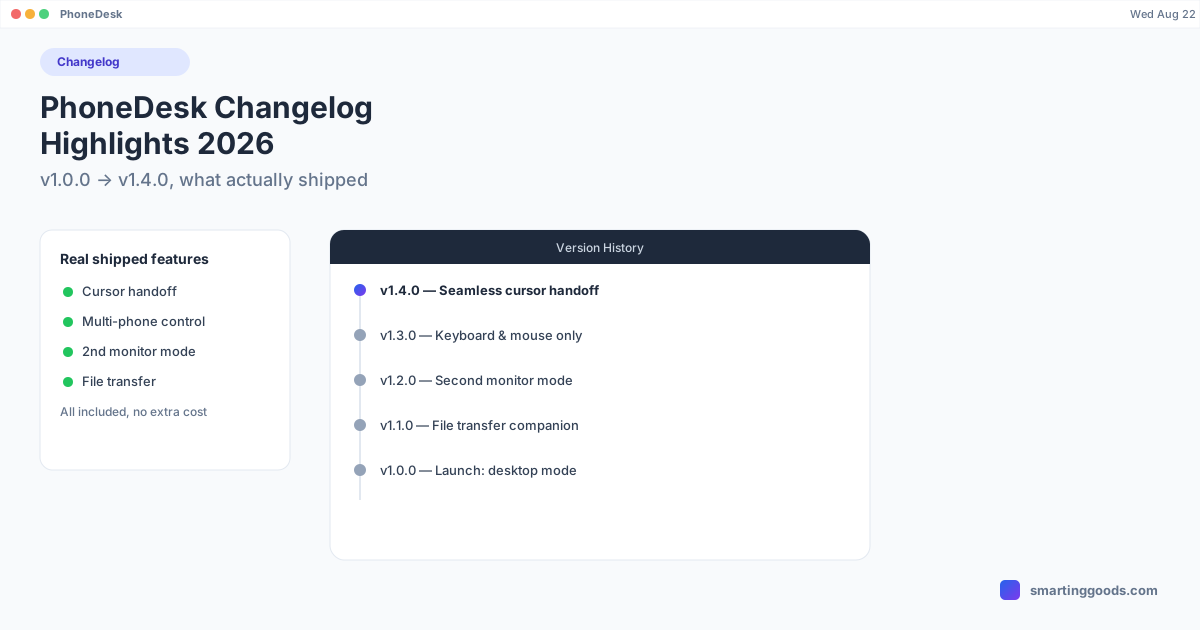
PhoneDesk launched doing one thing — Android desktop mode on a Mac, over USB or Wi-Fi, with no Homebrew or command line required. Since then it's added a companion app for file transfer, a full second-monitor mode, keyboard-and-mouse-only control of the phone's own screen, and — most recently — seamless cursor handoff between your Mac and your phone's screen, plus support for controlling multiple phones from one Mac. Below is the real, unedited version history.
Version 1.4.0 — August 6, 2026
The newest release adds Keyboard & Mouse Seamless — you move your Mac's cursor straight onto your phone's screen the way you'd drag it onto a second monitor, and it comes back the same way. There's no window to click into first; your keyboard just follows wherever the cursor is.
If you've got more than one phone connected, you can glide the cursor from one phone's screen directly onto the next without passing back over your Mac in between — useful if you're working across two devices side by side. This release also smooths out pointer movement when multiple phones are connected over Wi-Fi, and fixes reconnection reliability on networks that block Bonjour (common on some corporate or public Wi-Fi).
Version 1.3.0 — July 28, 2026
This release introduced Keyboard & Mouse Only mode — a lighter alternative to full seamless cursor handoff. Instead of a mirrored view, you get a real pointer you can hover and click with directly on your phone's own screen, controlled from your Mac's keyboard and trackpad. Nothing gets mirrored back to the Mac; you just focus the small PhoneDesk window and type. It works over USB or Wi-Fi and needs Android 11 or later.
1.3.0 also fixed a real annoyance in second-monitor mode: previously, switching apps on your phone while it was acting as a display could interrupt the session. Now it survives app switching — leave it, use something else, come back, and it picks up where it left off. A new "Second Display Active" notification also lets you jump straight back to your display with one tap.
Version 1.2.0 — July 20, 2026
This is when phone-as-second-monitor mode shipped. Picking "Use as Second Display" turns your phone into a real, arrangeable display you can drag Mac windows onto — not a mirrored view, an actual extended desktop. It works over USB or Wi-Fi with full-motion video and a pointer that keeps pace.
The release notes also include a practical tip that's easy to miss: for the sharpest picture, open System Settings → Displays on your Mac, turn on "Show all resolutions," and pick the highest one listed for PhoneDesk Display. 1.2.0 also extended second-monitor support back to phones running Android 9 and later, so older handsets can be pressed into service as a screen.
Version 1.1.x — July 18–19, 2026
Version 1.1.0 shipped the PhoneDesk companion app for the phone side — it installs automatically when you connect, with nothing to set up manually. This unlocked file transfer: share from any app, pick files inside the companion, or drag and drop them onto the desktop-mode window, and they land straight on your Mac. Text and links now share straight to your Mac's clipboard too. This release also cleaned up a rough edge — the phone's desktop display now clears itself immediately when you unplug the cable, reboot, or quit PhoneDesk, instead of hanging in a stale state.
1.1.1, a day later, was mostly reliability work — clearer setup guidance for wireless pairing and general licensing/connection fixes.
Version 1.0.x — July 17, 2026 (Launch)
PhoneDesk's first release did the core job: Android desktop mode running on a Mac, over USB or Wi-Fi, with cable-free setup via a pairing code or QR scan. Everything needed was bundled into the app — no Homebrew, no command-line tools to install separately — sold as a one-time $25 license activated offline. 1.0.1 and 1.0.2 followed the same day and the day after with wireless pairing reliability fixes, a new app icon, and general polish.
What This Pace Means If You're Deciding Whether to Buy
The practical takeaway from this history: PhoneDesk went from a single-feature desktop-mode launcher to a tool with file transfer, a genuine second-monitor mode, and two different levels of keyboard/mouse control, in about six weeks. If you bought the v1.0.0 license, every one of those updates has been included — that's the point of "auto-updates, signed and notarized" being part of the app rather than a separate purchase.
Frequently Asked Questions
Q: Do I have to pay again for these updates? A: No. PhoneDesk is a one-time $25 purchase that includes updates — the app auto-updates through Sparkle, so version 1.4.0's features are included for anyone who bought the license at 1.0.0.
Q: What's the newest PhoneDesk feature? A: As of version 1.4.0 (August 6, 2026), the newest feature is Keyboard & Mouse Seamless — moving your Mac's cursor directly onto your phone's screen and back, including gliding between multiple connected phones.
Q: When did phone-as-second-monitor mode ship? A: Version 1.2.0, released July 20, 2026. It's had two follow-up improvements since: session persistence across app switches (1.3.0) and smoother multi-device pointer movement (1.4.0).
Q: Does PhoneDesk still require a cable? A: No — wireless setup via QR code or pairing code has been supported since the very first release (1.0.0).
Bottom Line
PhoneDesk has shipped a new version roughly every one to two weeks since its July 2026 launch, moving from a single-purpose desktop-mode tool to one covering desktop mode, second-monitor use, file transfer, and seamless keyboard/mouse handoff — all included in the original one-time purchase.
PhoneDesk is a $25 one-time license — no subscription, updates included, 14-day no-questions refund. See the full feature list →