PhoneDesk vs. Buying a Second Monitor: A Real Cost Comparison
PhoneDesk costs $25 one-time; portable monitors run $45–$140+. An honest cost comparison, including when a real monitor is still the better buy.
PhoneDesk vs. Buying a Second Monitor: A Real Cost Comparison
If you're weighing a $25 app against a $100+ piece of hardware, the honest answer is: they're not really solving the same problem for the same person. This is a real cost comparison, including where a second monitor is still the right call.
The two options, plainly
PhoneDesk is a $25 one-time macOS license that, among other things, turns an Android phone you already own into a real second display for your Mac — it shows up in Displays settings, you can drag windows onto it, and it runs over USB or Wi-Fi. No subscription, no trial gate, and a 14-day no-questions refund if it doesn't work out.
A dedicated portable monitor is a physical screen — usually 13" to 17", USB-C or HDMI — that you buy once and plug in whenever you need extra screen space.
What each actually costs
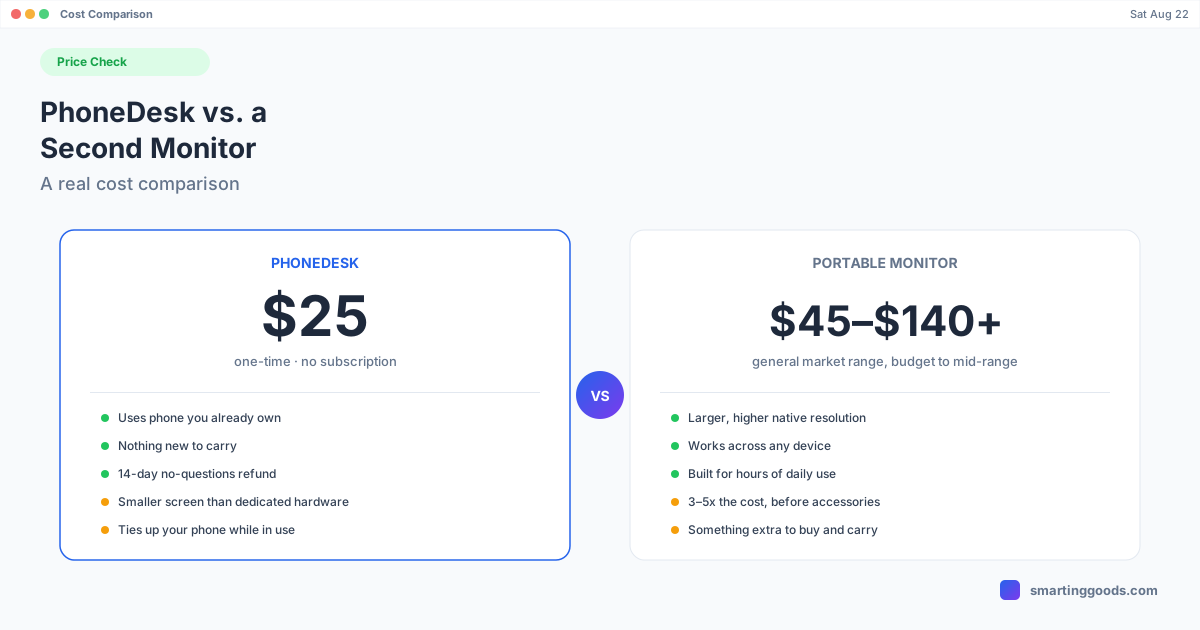
PhoneDesk's price is fixed and confirmed: $25, one time, unlimited devices on one Mac. That's the entire cost — there's no accessory tier, no "second monitor add-on" price.
A dedicated portable monitor is a real market with a wide range. Budget 15.6" USB-C 1080p panels commonly run somewhere in the $45–$70 range, and mid-range models with better panels, built-in speakers, or sturdier stands push into the $70–$140+ range before you get into larger or higher-resolution options that cost more still. Those are general market ranges, not a specific product recommendation — shop around, but expect three to five times PhoneDesk's price at minimum for even a budget unit, before a cable, stand, or case you might also want.
So the direct dollar comparison, if you already own an Android phone:
| PhoneDesk | Portable monitor | |
|---|---|---|
| Upfront cost | $25 | ~$45–$140+ |
| Extra hardware to buy | None (uses your phone) | The monitor itself, possibly a stand/case |
| Something new to carry | No | Yes |
| Refund if it's not for you | 14 days, no questions | Depends on retailer's return policy |
Where PhoneDesk genuinely wins
If you already own an Android phone and just need occasional extra screen space — a chat window, a reference doc, a Slack sidebar while you work in the main window — PhoneDesk gets you there for $25 using hardware that's already in your pocket. There's nothing extra to buy, charge, or find room for in a bag. It works over Wi-Fi as well as USB, and it supports Android 9 and later, since the Mac does the actual display rendering and the phone just decodes and shows the video.
For anyone who's on the fence about whether "phone as second monitor" is even useful to them day to day, $25 is a low-risk way to find out — especially with a 14-day refund window if it turns out you don't use it.
Where a real monitor is still the better buy — and we'll say so
This is the part a sales page usually skips, so let's be straightforward about it:
Screen size and resolution. A phone screen, even a large one, is smaller than a 15" or 17" portable monitor, and you're working within whatever resolution and aspect ratio your specific phone has. If you need genuinely large second-screen real estate — a full spreadsheet, a wide timeline, two documents side by side — a dedicated monitor gives you more usable pixels.
Dedicated purpose. A portable monitor is just a monitor: no notifications popping up, no worrying about your phone's battery, no need to have your phone tied up as a display instead of, well, a phone. If you want a second screen that's always available and never doing double duty, hardware wins.
Multi-device use. A portable monitor works with any laptop, gaming console, or device with the right video output — it's not tied to Android or to PhoneDesk. If you need a second screen across several machines, buying the hardware is the more flexible long-term choice.
Heavier daily use. If "second monitor" means hours a day, every day, dedicated hardware built for that job — better stand, better panel, no phone battery to manage — will hold up better than repurposing a phone.
The honest framing
PhoneDesk isn't trying to replace a real monitor for someone who needs one. It's a $25 option for someone who wants occasional extra screen space without buying anything new, using a phone they already own. If that's the use case, it's hard to beat on price. If you need a dedicated, always-on, large display for heavy daily work, a real portable monitor is worth the extra cost — and PhoneDesk's own second-monitor guide is upfront about that trade-off too.
Frequently Asked Questions
Q: Is PhoneDesk trying to be a replacement for a real monitor? A: No — it's positioned as a way to use a phone you already own as occasional extra screen space, not as a substitute for a dedicated large display if that's what you actually need.
Q: Does PhoneDesk's second-monitor feature cost extra on top of the $25? A: No. The $25 one-time license covers desktop mode, the second-monitor feature, screen mirroring, and file transfer — there's no separate charge for any of it.
Q: What if I buy PhoneDesk and decide I'd rather have a real monitor? A: PhoneDesk has a 14-day no-questions refund, requested from the manage-order page or by replying to your license email — so trying it costs nothing if it turns out hardware is the better fit for you.
Q: Does the picture quality on a phone-as-monitor setup match a real monitor? A: It depends on your phone and connection — USB gives the most bandwidth headroom for a sharp picture, while Wi-Fi automatically drops resolution and bitrate to stay smooth. Turning on "Show all resolutions" in Mac Displays settings and picking the highest listed option helps get the sharpest result either way, but a phone screen's native resolution and size are still the ceiling.
Q: Can I use PhoneDesk on more than one phone? A: Yes — the license covers unlimited devices on one Mac.
Try It Before You Buy Hardware
If you already own an Android phone and want to see whether extra screen space actually helps your workflow before spending $100+ on a monitor, PhoneDesk is $25 one-time with a 14-day refund. See how the second-monitor feature works →