Samsung DEX on Linux: Does It Work, and How
Linux on DeX was a real Samsung feature — until Samsung killed it in 2019. Here's the verified timeline, what still works today, and why it's a different problem than DEX on Mac.
Samsung DEX on Linux: Does It Work, and How
If you're searching "Samsung DEX Linux" hoping to run a Linux desktop on your Galaxy phone, you're a few years too late — Samsung built exactly that feature, called it Linux on DeX, and then killed it. If you're searching because you want DEX itself to run on a Linux computer the way DEX for PC runs on Windows, the answer is different but just as blunt: Samsung never built that either.
Both are reasonable things to want. Neither exists anymore, or ever did, in the form most people expect. Here's what actually happened, what still works today, and where a tool like PhoneDesk fits (and doesn't).
What "Samsung DEX on Linux" Could Even Mean
The phrase gets searched with two completely different intents, so it's worth separating them before anything else:
- Running a Linux desktop environment inside DEX, on the phone itself — this was a real Samsung feature, Linux on DeX, launched in beta in 2018.
- Running Samsung DEX on a Linux PC, the way Samsung's DEX for PC app lets Windows users cast DEX to a laptop screen — this was never released for Linux, ever, on any platform.
Nearly everyone landing on this search means the first one, so that's where we'll spend most of this guide. But if you meant the second, skip to the DEX for PC section below — the short version is it's a dead end, and PC connectivity isn't why PhoneDesk exists either.
Linux on DeX Is Discontinued — Here's the Timeline
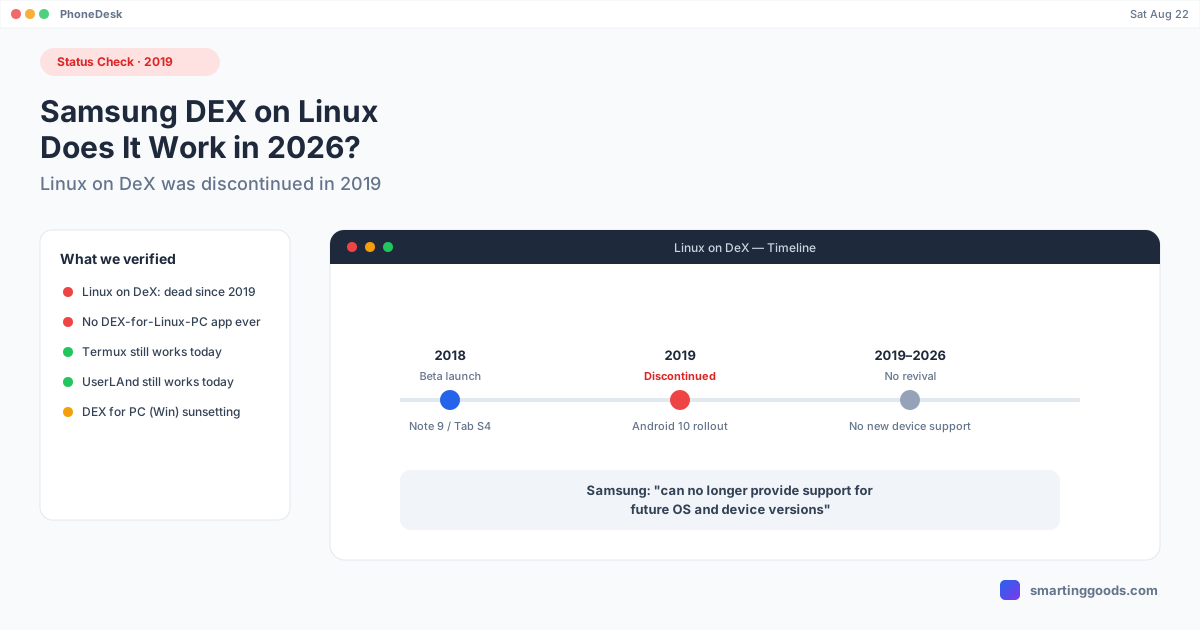
Samsung launched Linux on DeX as a beta program in late 2018, alongside the Galaxy Note 9 and Galaxy Tab S4. The idea was genuinely clever: install a full Ubuntu-based Linux distribution as an app on your phone, and when you switched into DEX mode, you could run that Linux environment — real terminal, real dev tools, real desktop apps — using your phone's own ARM processor, all while still plugged into a monitor via DEX.
It didn't last long. Samsung discontinued Linux on DeX in 2019, and support was formally dropped with the Android 10 rollout — Samsung's own statement at the time said it could "no longer provide support for future OS and device versions." No Galaxy device released since has official Linux on DeX support, and Samsung has given no indication of reviving it. If you find a setup guide for Linux on DeX published after 2019, treat it as outdated — it's describing a feature current phones don't have.
Bottom line: as of 2026, there is no supported way to run Linux inside Samsung DEX. This isn't a bug or a hidden setting — Samsung actively removed the underlying support.
Why Samsung Killed It
Samsung never gave a detailed public explanation beyond the "can no longer support future OS versions" line, but the practical reasons are easy to infer: Linux on DeX required Samsung to maintain compatibility between a rapidly-changing Android/DEX display stack and a full Linux kernel/userspace running in a container-like layer on top of it. Every Android version bump and every new chipset meant more surface area to keep working. It was a beta feature with a narrow audience (developers wanting a portable Linux box), and Samsung apparently decided the maintenance cost wasn't worth it compared to just improving DEX itself as an Android desktop environment.
What Still Works Instead
Linux on DeX being dead doesn't mean "Linux + Galaxy phone" is a dead end entirely — a few paths still work in 2026, just not the official Samsung one:
- Termux. A terminal emulator and Linux environment app that runs without root, available on the Play Store and F-Droid. It gives you a real Linux userland (apt-style package manager, Python, Node, SSH, etc.) running alongside normal Android — including inside a DEX session, since it's just an app. It's not a full graphical desktop distro like Linux on DeX was, but for command-line work it covers most of what people actually wanted Linux on DeX for.
- UserLAnd or similar chroot/proot-based apps. These can get you a more complete Ubuntu or Debian environment with a VNC-based GUI, running as a regular Android app — no root required, no Samsung feature dependency.
- DEX itself, for everything that isn't Linux-specific. If what you actually wanted was a desktop-shaped workspace for writing, browsing, email, and office work, plain DEX (still fully supported and actively developed by Samsung) already does that without needing a Linux layer underneath it.
None of these are "Linux on DeX" in the literal, Samsung-branded sense — but they're the closest working equivalents in 2026.
DEX for a Linux PC Never Existed
If your search intent was the second one — running DEX on a Linux computer the way Windows users cast DEX to a PC screen — there's nothing to discontinue, because Samsung never shipped it in the first place. Samsung's DEX for PC app was Windows-only, and even that Windows app is being phased out: Samsung has confirmed DEX for PC on Windows will end support starting with One UI 7, with Samsung pointing Windows users toward Microsoft's Phone Link app instead. DEX itself keeps working wirelessly to any Miracast-compatible display on newer Galaxy devices (Galaxy S26 series, Galaxy Z Fold 7, Galaxy Tab Active5 Pro) — just not through a dedicated PC companion app on either Windows or Linux.
So: no Linux DEX-for-PC app ever existed, and the equivalent Windows app is being sunset too.
How PhoneDesk Fits — and Where It Doesn't
To be direct about scope: PhoneDesk does not run on Linux, and it doesn't put DEX on a Linux machine. PhoneDesk is a macOS menu bar app. If you're on a Linux desktop looking for a DEX bridge, PhoneDesk isn't the answer to that specific question, and none of the workarounds above change that.
Where PhoneDesk is relevant is a different, related problem: getting DEX (or Pixel desktop mode) to run as a real window on a Mac — which, like Linux, was never given an official Samsung app either. Samsung built DEX for Windows and monitors with the right cable; it built nothing for macOS, the same way it built nothing for Linux. PhoneDesk closes that specific gap using Android's own adb and scrcpy tools under the hood, bundled into a one-click menu bar experience — no terminal, no manual adb commands, DEX opens as a normal resizable window on your Mac.
If you use both a Mac and occasionally need a Linux-flavored terminal on your phone, that combination still works today: Termux running locally on the phone, displayed inside a DEX (or mirrored) session that PhoneDesk puts in a window on your Mac. You get a real terminal, just not through the discontinued Samsung feature.
See the full setup in the Samsung DEX on Mac guide.
Frequently Asked Questions
Q: Is Linux on DeX coming back? A: There's no indication of that. Samsung discontinued it in 2019 with the Android 10 rollout and has released no Galaxy device since with official Linux on DeX support. Treat any revival rumor as unconfirmed until Samsung says otherwise.
Q: Can I still install Linux on DeX manually on an old phone? A: On a device that had it installed before Samsung pulled support, the app may still be present, but it's unsupported — no updates, no compatibility guarantees with your current Android version, and it will not work on any phone released after the feature was killed.
Q: What's the closest thing to Linux on DeX today? A: Termux for command-line Linux tools, or UserLAnd for a more complete GUI-based distro — both run as regular non-root Android apps, independent of Samsung's discontinued feature, and both work fine inside a DEX session.
Q: Does Samsung DEX for PC work on Linux? A: No — DEX for PC was Windows-only and was never released for Linux. Samsung is also ending support for the Windows version starting with One UI 7, pointing users to Microsoft's Phone Link app instead.
Q: Does PhoneDesk bring DEX to Linux? A: No — PhoneDesk is a macOS-only menu bar app. It solves the equivalent problem for Mac users (Samsung never built DEX for macOS either), driving DEX or Pixel desktop mode as a real window on a Mac using adb/scrcpy under the hood.
The Bottom Line
Samsung DEX on Linux, in the sense most people mean it, is a closed chapter — Linux on DeX shipped as a beta in 2018 and was discontinued in 2019, and no DEX-for-PC equivalent was ever built for Linux at all. Termux and similar apps cover most of what people actually wanted from it. If your real goal is a desktop-shaped DEX session and your daily driver happens to be a Mac rather than Linux or Windows, that's a gap PhoneDesk was built to close.
PhoneDesk is a $25 one-time license — no subscription, 14-day no-questions refund. See the full feature list →