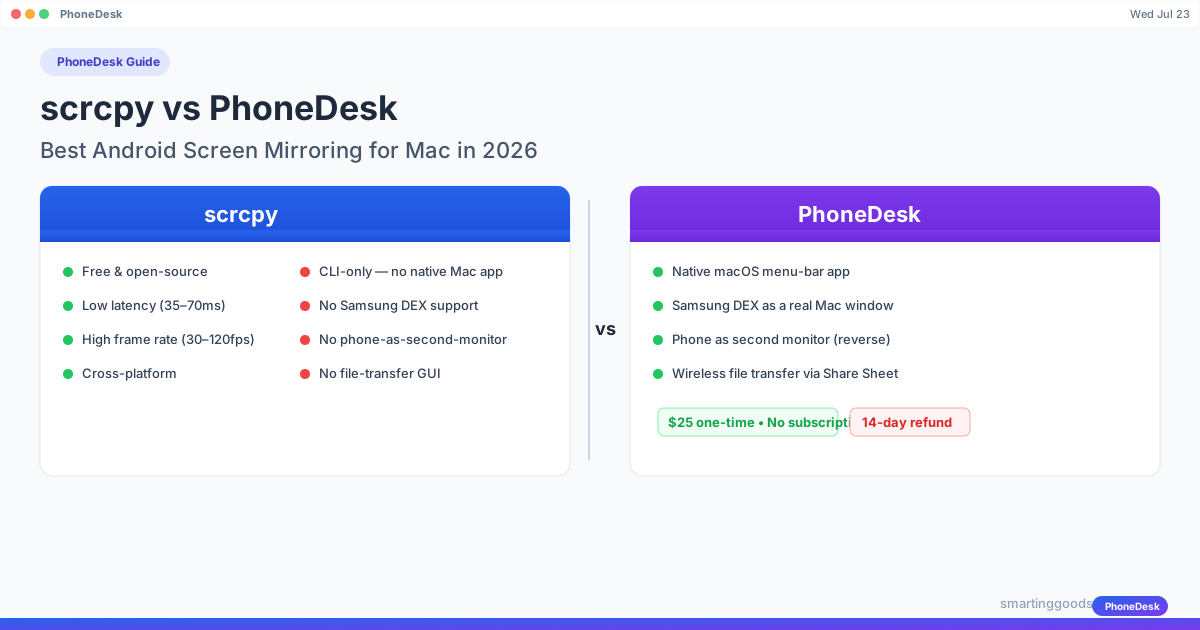
scrcpy vs PhoneDesk: Best Android Screen Mirroring for Mac in 2026
Compare scrcpy vs PhoneDesk for Android screen mirroring on Mac in 2026. scrcpy is free but CLI-only. PhoneDesk is a $25 native macOS app with DEX, second-monitor, and file transfer.
scrcpy vs PhoneDesk: Best Android Screen Mirroring for Mac in 2026
If you own a Mac and an Android phone, you've probably searched for a way to mirror your Android screen to your Mac. It shouldn't be this hard — but somehow it is. Apple has AirPlay for its own ecosystem, and Android is left as an afterthought on macOS.
Two options stand out in 2026. scrcpy — the free, open-source, CLI powerhouse that developers swear by. And PhoneDesk — a native macOS menu-bar utility that gives you screen mirroring, Samsung DEX support, phone-as-second-monitor, and wireless file transfer in one polished app.
Which one should you use? It depends on what you need from your Android screen mirroring setup. Here is an honest, head-to-head comparison.
What Is scrcpy?
scrcpy (short for "screen copy") is a free, open-source tool by Genymobile that lets you display and control Android devices from your computer. It works over USB or wirelessly (TCP/IP), does not require root access, and runs on Windows, macOS, and Linux. scrcpy has been around since 2018 and is actively maintained.
scrcpy is famous for three things: it is free, it is fast, and it runs in a terminal. There is no GUI, no installer wizard, no menu bar icon — just a command-line interface that pipes your phone's screen over ADB (Android Debug Bridge) into a resizable window on your desktop.
What Is PhoneDesk?
PhoneDesk is a native macOS app that lives in your menu bar. It does three things: (a) drives Samsung DEX (and Pixel desktop mode) as a proper Mac window, (b) turns your Android phone into a real second monitor for your Mac, and (c) lets you send files and text from phone to Mac wirelessly via the share sheet — no MTP cable needed.
Unlike scrcpy, PhoneDesk is a commercial product with a single $25 one-time license. No subscription. It was built specifically for Mac users who want a native, polished experience — not a terminal window.
scrcpy vs PhoneDesk: Side-by-Side Comparison
| Feature | scrcpy | PhoneDesk |
|---|---|---|
| Price | Free | $25 one-time |
| Native macOS app | No — CLI only | Yes — menu bar utility |
| Setup time | 5-15 minutes (install Homebrew, ADB, enable USB debugging) | ~2 minutes (download, open, plug in) |
| USB mirroring | Yes — 35–70ms latency | Yes — native |
| Wireless mirroring | Yes (TCP/IP, requires ADB setup) | Yes |
| Samsung DEX support | No | Yes — as a real Mac window |
| Pixel desktop mode | No | Yes |
| Phone as second monitor | No | Yes — reverse direction |
| File transfer | adb push/pull (CLI only) | Wireless share sheet, drag-and-drop |
| Audio forwarding | Yes (Android 11+) | Yes |
| Screen recording | Yes (CLI flags) | Yes |
| Max frame rate | 30–120fps | 60fps |
| Max resolution | Device native (1920×1080+) | Device native |
| Open source | Yes (Apache 2.0) | No |
| Account required | No | No |
| Ads | None | None |
| Refund policy | N/A (free) | 14-day no-questions refund |
| Platforms | Windows, macOS, Linux | macOS only |
Setup: Terminal vs Menu Bar
The most visible difference between scrcpy and PhoneDesk is setup.
scrcpy Setup
To use scrcpy on a Mac, you need:
- Install Homebrew (if you don't have it)
- Run
brew install scrcpy— which installs scrcpy, ADB platform tools, and dependencies - Enable Developer Options on your Android phone
- Enable USB Debugging in Developer Options
- Plug in your phone via USB
- Accept the RSA key fingerprint prompt on your phone
- Run
scrcpyin your terminal
That's about 10 minutes for a first-time setup. It is not hard if you are comfortable with a terminal, but it is a barrier for casual users. Wireless setup adds extra steps — you need to connect via USB first, run adb tcpip 5555, disconnect, then connect over Wi-Fi using your phone's IP address.
PhoneDesk Setup
- Download PhoneDesk
- Open the app — it lives in your menu bar
- Plug in your Android phone via USB (or pair wirelessly)
- That's it
PhoneDesk handles ADB detection, device discovery, and permissions in the background. There is no terminal. No Homebrew. No command flags to remember.
Samsung DEX and Desktop Mode
This is where scrcpy falls short and PhoneDesk shines.
scrcpy mirrors whatever is on your phone's screen — literally. It captures the phone display and shows it in a window. If you launch Samsung DEX on your phone, scrcpy will show the DEX interface as a mirrored phone screen inside its window. It works, but it is constrained by the phone's display dimensions and scrcpy's window.
PhoneDesk drives Samsung DEX (and Pixel desktop mode) as a real, independent Mac window. DEX gets its own window with proper aspect ratio, full keyboard and mouse support, and no phone-frame cropping. It behaves like any other Mac app — you can resize it, fullscreen it, drag files into it, and use native Mac shortcuts.
If you use Samsung DEX regularly, this alone makes PhoneDesk worth the $25.
Phone as a Second Monitor
scrcpy cannot do this. It is one-directional: phone screen → computer window. There is no reverse mode.
PhoneDesk can turn the tables. It creates a virtual display on your Mac and streams it to your Android phone over Wi-Fi or USB. Your phone becomes a real second monitor — extended desktop, not just mirroring. You can drag Finder windows, browser tabs, or a Slack sidebar onto the phone screen. It works like a portable second display.
This is useful when you are traveling, working from a café, or just need extra screen real estate without carrying a monitor.
File Transfer: Command Line vs Share Sheet
Moving files between your Android phone and Mac should be simple. In practice, it is often frustrating.
scrcpy has basic file transfer through adb push and adb pull commands. You type the full file path, run the command, and the file transfers over USB. It works, but it is slow and cumbersome for quick transfers. There is no drag-and-drop, no GUI, no wireless option specifically for file transfer.
PhoneDesk adds a wireless file transfer feature through the Android share sheet. On your phone, tap Share on any file, select PhoneDesk, and the file appears on your Mac instantly — no MTP, no USB cable. You can also drag and drop files from your Mac into the PhoneDesk window.
For copying text, PhoneDesk has a clipboard sync feature. Copy on your phone, paste on your Mac, and vice versa.
UI Quality: Native Mac vs Terminal Window
scrcpy opens a basic window. It uses SDL (Simple DirectMedia Layer) for rendering, so it looks and feels like an emulator window — not a native Mac app. The window has no toolbar, no menu, no status indicators. All controls are keyboard shortcuts: Ctrl+f for fullscreen, Ctrl+Shift+o for device screen off, and so on.
PhoneDesk is built with SwiftUI and designed for macOS. It places a small icon in your Mac menu bar. Click it to see connected devices, start mirroring, enable DEX mode, or transfer files. The mirroring window uses native Mac rendering with proper window controls, resize handles, and drag-and-drop support.
For a power user who lives in the terminal, scrcpy's approach is fine — even desirable. For everyone else, PhoneDesk feels like an app that belongs on a Mac.
Latency and Performance
scrcpy's 35–70ms USB latency is genuinely impressive for a free tool. Over a wired USB connection, scrcpy feels almost native. Swipes, taps, and typing register quickly. The latest v4.0 release added flex display support, better aspect-ratio locking, and a custom background color — small quality-of-life improvements that show the project is still evolving.
PhoneDesk's latency is comparable over USB. Over Wi-Fi, both tools introduce some lag, but PhoneDesk's second-monitor mode is designed for static content (docs, reference material, chat) rather than gaming, so the latency profile is different.
For gaming or real-time UI testing, scrcpy's raw speed edge matters. For DEX, desktop mode, and productivity use, PhoneDesk's feature set outweighs the small latency difference.
Pricing: Free vs $25
scrcpy is free. Zero cost. No account, no ads, no feature gates. This is its strongest advantage.
PhoneDesk costs $25 — one time. No subscription. No upsells. And there is a 14-day no-questions refund if it does not work for you.
The question is not whether $25 is a lot (it is not, compared to Vysor's $40 lifetime or AirDroid's annual subscription). The question is whether the features PhoneDesk adds on top of screen mirroring — DEX support, phone-as-second-monitor, wireless file transfer, native macOS UI — justify the cost for your workflow.
Who Should Use scrcpy?
- Developers and QA testers who need raw ADB control and high frame rates for app testing
- Power users who are comfortable with a terminal and prefer open-source tools
- Linux users — scrcpy has native Linux support; PhoneDesk does not
- Anyone on a tight budget who only needs basic screen mirroring
Who Should Use PhoneDesk?
- Samsung DEX users who want DEX as a proper Mac window (this alone is the killer feature)
- Mac users who want a native app — menu bar, no terminal, proper Mac window management
- Anyone who needs a second monitor on the go — PhoneDesk turns your phone into a portable external display
- Users who transfer files regularly between Android and Mac and want wireless drag-and-drop
- Users who want a single app that covers mirroring, DEX, second monitor, and file transfer
Frequently Asked Questions
Q: Is scrcpy safe to use? A: Yes. scrcpy is open-source (Apache 2.0), widely audited, and runs entirely locally over ADB. No data leaves your network. Download from the official GitHub repository to avoid modified versions.
Q: Can scrcpy run Samsung DEX? A: It can mirror the DEX interface from your phone screen, but it treats DEX as a phone display — not a proper desktop window. PhoneDesk drives DEX as an independent Mac window with native resize and input support.
Q: Does PhoneDesk work wirelessly? A: Yes. PhoneDesk supports both USB and wireless connections. The wireless setup is simpler than scrcpy's TCP/IP method.
Q: Can scrcpy turn my Android phone into a second monitor for my Mac? A: No. scrcpy is one-directional — phone to computer. PhoneDesk has a dedicated second-monitor mode that streams your Mac screen to your Android phone.
Q: Do I need to root my phone for scrcpy or PhoneDesk? A: No. Neither tool requires root access. Both work with USB Debugging enabled in Developer Options.
Q: Which is better for gaming — scrcpy or PhoneDesk? A: scrcpy. Its 35–70ms latency and support for up to 120fps make it better for gaming. PhoneDesk is designed for productivity use.
Q: Is PhoneDesk really a one-time payment with no subscription? A: Yes. PhoneDesk is $25 for a lifetime license. No subscription, no monthly fee, no hidden charges. There is a 14-day money-back guarantee.
The Bottom Line
scrcpy is an incredible tool — free, fast, open-source, and powerful. If you only need basic screen mirroring on a Mac and are comfortable with a terminal, scrcpy is hard to beat at its price (free).
But scrcpy was never designed to do what PhoneDesk does. It cannot drive Samsung DEX as a proper Mac window. It cannot turn your phone into a second monitor. It has no GUI for file transfer. It is a developer tool that also happens to work for mirroring.
PhoneDesk fills those gaps. It gives you a polished macOS app that covers screen mirroring, DEX support, phone-as-second-monitor, and wireless file transfer — all in one $25 purchase.
If you use DEX regularly or travel with just a MacBook and a phone, PhoneDesk pays for itself on the first trip. And if it does not work for you, the 14-day refund means there is no risk.
Try PhoneDesk for macOS → Learn how PhoneDesk handles DEX on Mac → Turn your Android phone into a second monitor →