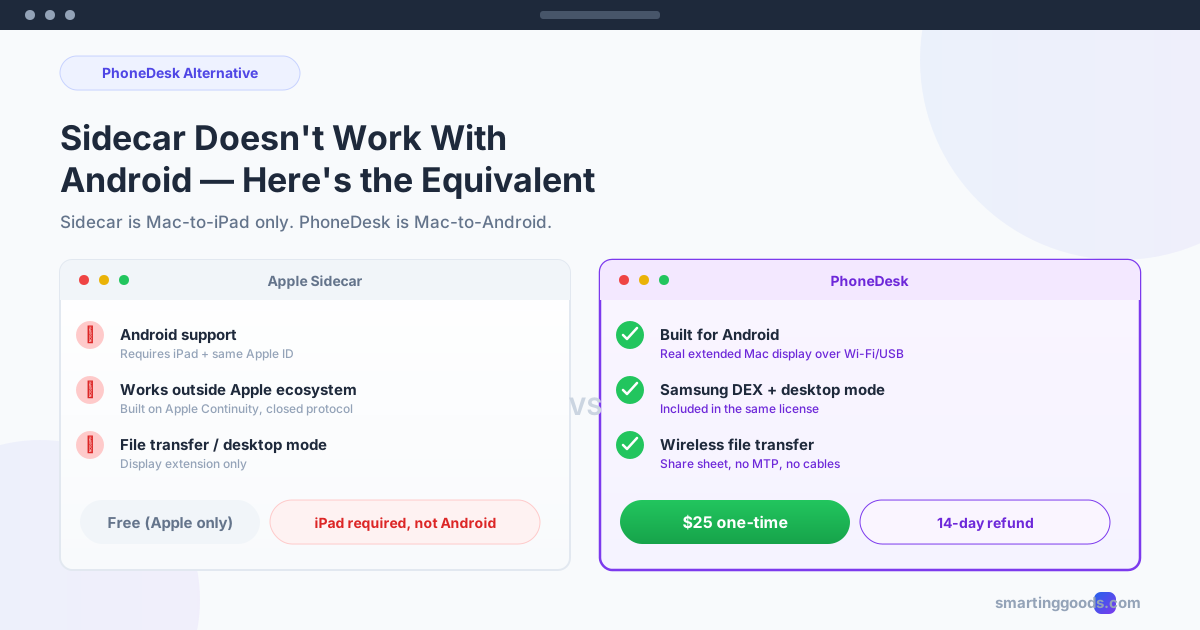
Sidecar Doesn't Work With Android — The Equivalent
Apple's Sidecar only pairs a Mac with an iPad. If your phone is Android, here's the direct equivalent for turning it into a real second Mac display.
Sidecar Doesn't Work With Android — Here's the Equivalent
Apple's Sidecar is one of the smoothest features in macOS — turn on an iPad, and it's instantly a wireless second display for your Mac, no app to install, no setup beyond being signed into the same Apple ID. It's also completely off-limits if the device in your hand is an Android phone instead of an iPad.
This isn't a bug or a setting you're missing. Sidecar is built exclusively for Apple-to-Apple pairing. Here's why, and what actually works if your phone is Android.
Why Sidecar Is Apple-Only
Sidecar relies on tight integration between macOS and iPadOS — shared Apple ID authentication, Apple's Continuity framework, and hardware/software that Apple controls end to end on both sides of the connection. That's exactly why it feels so seamless: there's no companion app, no manual pairing, no network configuration. It just works, because both devices are speaking Apple's proprietary protocols natively.
Requirements for Sidecar, for reference:
- Mac: 2016 or newer, running a recent macOS version
- Secondary device: iPad (2018 or newer models generally), running a compatible iPadOS version
- Same Apple ID signed into both devices, with Wi-Fi and Bluetooth on (or a cable, for wired mode)
There's no Android equivalent listed anywhere in these requirements because there isn't one — Sidecar was never designed to support a third-party OS, and nothing in Android's architecture would let it authenticate the same way an iPad does.
What This Means If You Own an Android Phone
If you've been searching for "Sidecar for Android" or "Sidecar alternative Android," the honest answer is that you're not missing a hidden setting — you need genuinely different software, not a workaround for Sidecar itself. The good news is the underlying idea (turn a phone into a real second display for your Mac) is absolutely achievable on Android, just through a different app built for that ecosystem.
PhoneDesk — The Closest Equivalent for Android
PhoneDesk aims at the same outcome Sidecar delivers for iPad — your phone becomes a genuine extended display for your Mac, not a mirror — but built specifically around Android from the ground up.
How it compares functionally:
- Setup: Sidecar needs zero apps (built into both OSes). PhoneDesk needs a menu bar app on the Mac and a free companion app on the phone — a couple minutes of setup, one time.
- Connection: Sidecar uses Apple's Continuity framework over Wi-Fi/Bluetooth or USB. PhoneDesk connects over Wi-Fi (with QR-code pairing) or USB.
- Display behavior: Both create a real, arrangeable extended display — not a mirror — that shows up in System Settings → Displays and accepts dragged windows.
- Price: Sidecar is free (built into macOS/iPadOS, assuming you already own both devices). PhoneDesk is $25 one-time — no subscription.
The practical difference is mostly about which ecosystem you're in, not which experience is "better." If you owned an iPad, Sidecar would be the obvious free choice. Since you own an Android phone, PhoneDesk is the tool actually built for that pairing.
What Else PhoneDesk Adds Beyond the Sidecar Comparison
Sidecar does one thing — second display. The same PhoneDesk license covers two more use cases that Android owners commonly ask about right alongside "can I use my phone like an iPad with Sidecar":
- Samsung DEX / Pixel desktop mode as a Mac window — if your phone supports Android's own desktop mode, PhoneDesk drives it as a resizable window on your Mac, similar in spirit to how Sidecar lets an iPad app run full-screen, but for a full Android desktop session instead.
- Wireless file transfer — share files or text from your phone straight to your Mac via the Android share sheet, landing in Downloads or your clipboard. Apple users get this for free via AirDrop between Apple devices; PhoneDesk is the Android-to-Mac equivalent, without MTP cables.
Frequently Asked Questions
Is there any way to get Sidecar itself working with an Android phone? No — Sidecar is hard-coded to require an iPad (or another Mac, for the Mac-to-Mac variant) and Apple ID authentication. There's no configuration, jailbreak, or third-party trick that extends it to Android, because the underlying protocol isn't available outside Apple's ecosystem.
Does PhoneDesk feel as seamless as Sidecar? Setup takes a couple minutes the first time (installing the menu bar app and the companion Android app), versus Sidecar's zero-install experience. After that first setup, reconnecting is a single click or an automatic USB/Wi-Fi detection, similar to Sidecar's day-to-day feel.
Can I use PhoneDesk and Sidecar at the same time, with an iPad and an Android phone? Yes — they're unrelated apps targeting different devices, so there's no conflict running Sidecar with an iPad and PhoneDesk with an Android phone simultaneously if you own both.
Is PhoneDesk free like Sidecar? No — Sidecar is free because it's built into macOS and iPadOS, devices you already paid for as part of the Apple ecosystem. PhoneDesk is a $25 one-time license, since it's third-party software bridging Android to Mac, a pairing Apple doesn't natively support.
What if PhoneDesk doesn't work well with my specific phone? PhoneDesk includes a 14-day no-questions refund — request it from the manage-order page or by replying to your license email if it's not a fit for your setup.
Bottom Line
Sidecar is excellent, and it's also completely unavailable if your phone runs Android — that's an intentional ecosystem boundary, not a bug. PhoneDesk is the direct equivalent for Android owners: a real extended Mac display, built specifically for the phone you actually have.
$25 one-time, no subscription, 14-day refund. Get PhoneDesk → · Second-monitor setup guide →