TeamViewer for Android: Is There a Lighter Mac-Only Alternative?
TeamViewer works for Android-to-Mac remote access, but its business-grade licensing and overhead are a lot for personal use. Here's what it costs, what it's built for, and a lighter option.
TeamViewer for Android: Is There a Lighter Mac-Only Alternative?
TeamViewer is the name most people recognize when they think "remote access software," and its Android app does work from a Mac — you can view and control an Android device from a Mac client, or the reverse. The catch most personal users hit isn't whether it works technically; it's TeamViewer's licensing model, which is built for IT departments and gets expensive and complicated fast for someone who just wants their own phone accessible on their own Mac.
Here's what TeamViewer for Android actually does, where its pricing model trips people up, and a lighter alternative if that's all you need.
What TeamViewer for Android Does
TeamViewer is enterprise-grade remote access and support software with apps across every major platform. The Android app supports two directions:
- Controlling a remote computer from your Android phone — the more common use case, and fully supported.
- Being controlled/viewed from a computer — TeamViewer QuickSupport or the main app can allow a Mac (or PC) to remotely view and control an Android device, similar to AnyDesk, requiring the phone to grant screen-capture and Accessibility permissions.
For genuine IT support scenarios — helping a user on a device you don't own, troubleshooting remotely, or managing a fleet of company devices — TeamViewer is capable, mature software with features like session recording, multi-monitor support on the controlling side, and detailed access logs.
Setting Up TeamViewer to Control an Android Phone From a Mac
- Install TeamViewer QuickSupport (or the full TeamViewer app) on the Android phone from the Google Play Store.
- Open the app — it generates a session ID and password.
- On the Mac, open the TeamViewer desktop client (or teamviewer.com in browser) and enter the phone's ID.
- Approve the connection on the phone, granting the requested screen-sharing/Accessibility permissions.
- The phone's screen appears on the Mac, controllable with mouse and keyboard.
Setup itself is fairly quick — maybe five minutes — the friction shows up later, in licensing.
Where TeamViewer's Pricing Becomes the Real Problem
TeamViewer's free tier is explicitly licensed for personal, non-commercial use only, and the company actively detects and blocks what it considers "commercial use patterns" — even from individuals, if usage looks business-like (frequent sessions, certain device combinations, etc.). Plenty of individual users have hit a wall where TeamViewer flags their account and demands a paid license, sometimes unexpectedly.
Paid TeamViewer plans start in the range of several hundred dollars per year, aimed squarely at businesses managing fleets of devices — not someone who wants to occasionally check their own phone from their Mac. For that kind of casual personal use, you end up either walking a licensing tightrope on the free tier or paying business-software prices for a task that doesn't need business software.
Other Limits Beyond Pricing
Even ignoring licensing, TeamViewer for Android has the same structural gaps as other remote-desktop tools repurposed for phone control:
- No desktop-mode support — no integration with Samsung DEX or Pixel desktop mode, just a mirrored phone screen.
- No reverse mode — can't turn your Android phone into a second monitor for your Mac.
- Broad permissions required — full remote control needs Accessibility Service access on Android, the same heavier permission grant other remote-access tools require.
- Relay-based connection — sessions typically route through TeamViewer's servers even on the same network, adding latency a local connection wouldn't have.
A Lighter, Local Alternative: PhoneDesk
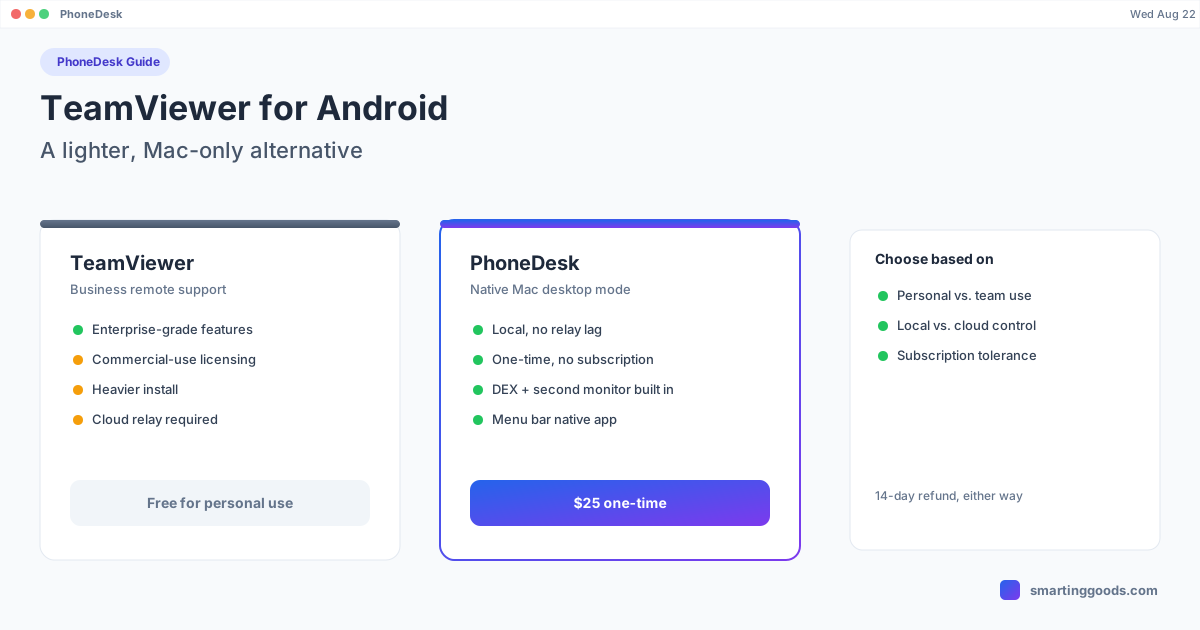
If what you actually want is simpler than "IT-grade remote access" — you own the phone, you own the Mac, they're together, and you want the phone's screen (or Samsung DEX, or Pixel desktop mode) usable on your Mac — PhoneDesk is built for exactly that, without any of TeamViewer's licensing complexity.
PhoneDesk is a native macOS menu bar app that connects to your Android phone locally over USB or Wi-Fi — no relay servers, no commercial-use detection, no per-year licensing. It:
- Drives Samsung DEX or Pixel desktop mode as a real Mac window
- Turns your Android phone into a second monitor for your Mac
- Sends files and text wirelessly through the Android share sheet — no cable, no MTP
It's a $25 one-time purchase — not per year, not a subscription — with a 14-day no-questions refund. For personal use, it's the difference between paying once and never thinking about licensing again, versus navigating TeamViewer's "are you commercial or not" gray area indefinitely.
TeamViewer or PhoneDesk?
- Use TeamViewer if you're supporting devices you don't own, managing multiple remote machines for a business, or need session recording and enterprise access controls.
- Use PhoneDesk if it's your own phone and your own Mac, and you want desktop mode, a second monitor, or file transfer without licensing friction or per-year costs.
Frequently Asked Questions
Q: Is TeamViewer really free for personal use? A: The free tier is licensed for personal, non-commercial use, but TeamViewer actively monitors for usage patterns it considers commercial and can lock accounts pending a paid license — even for individuals, based on session frequency or device combinations.
Q: How much does TeamViewer cost if I need a paid license? A: Business plans typically run several hundred dollars annually, priced for organizations managing multiple devices — not a single person accessing their own phone.
Q: Does TeamViewer support Samsung DEX? A: No, it mirrors the Android phone's standard screen with no specific handling for DEX or Pixel desktop mode.
Q: Can TeamViewer turn my Android phone into a second monitor? A: No. It's remote-control software, one-directional — computer views/controls the phone, not the reverse.
Q: Is PhoneDesk a real TeamViewer replacement? A: For personal Android-to-Mac use — not IT support or fleet management — yes. PhoneDesk covers what most individuals actually want (desktop mode, second monitor, file transfer) for a one-time $25 rather than TeamViewer's business-oriented licensing.
The Bottom Line
TeamViewer is solid software, but it's built and priced for IT support and business device management — not for someone who just wants their own Android phone usable alongside their own Mac. If you've hit TeamViewer's commercial-use wall, or just don't want the overhead, PhoneDesk covers the personal use case directly for a one-time $25.
See everything PhoneDesk does → Learn how PhoneDesk handles Samsung DEX on Mac →