Vysor vs PhoneDesk: Which Is Better for Android on Mac in 2026
Vysor mirrors your Android screen to a Mac window for $2.50/mo or $40 lifetime. PhoneDesk drives real desktop mode, second-monitor mode, and file transfer for a $25 one-time price. Here's the honest comparison.
Vysor vs PhoneDesk: Which Is Better for Android on Mac in 2026
If you've searched for a way to control or view your Android phone on a Mac, Vysor is probably the first result you hit. It's been around since 2015, it works, and its free tier is genuinely usable. So is it still the right pick in 2026, or has the landscape moved on?
Short version: Vysor is a solid, low-cost screen mirroring tool. PhoneDesk is a different category of app — it drives your phone's actual desktop mode (Samsung DEX, Pixel desktop mode) as a real window, turns your phone into a second monitor, and handles file transfer, all from a native Mac menu bar app. They overlap on basic mirroring, but that's about where the overlap ends.
What Is Vysor?
Vysor is a screen mirroring and remote control app for Android (and limited iOS) devices, available as a Chrome extension and as standalone desktop apps for Windows, Mac, and Linux. You plug your phone in over USB (or Wi-Fi on Pro), and Vysor mirrors the screen into a window where you can click, type, and drag files onto it. It's built by Clockwork Dev, has a huge install base, and is often the tool people mean when they say "just mirror my phone to my computer."
The free version works over USB only, mirrors at a capped resolution, and shows ads. Vysor Pro removes the ads and unlocks wireless mode, fullscreen, higher-quality mirroring, drag-and-drop file transfer, and screenshots — for $2.50/month, $10/year, or a $40 lifetime license.
Vysor vs PhoneDesk: Feature Comparison
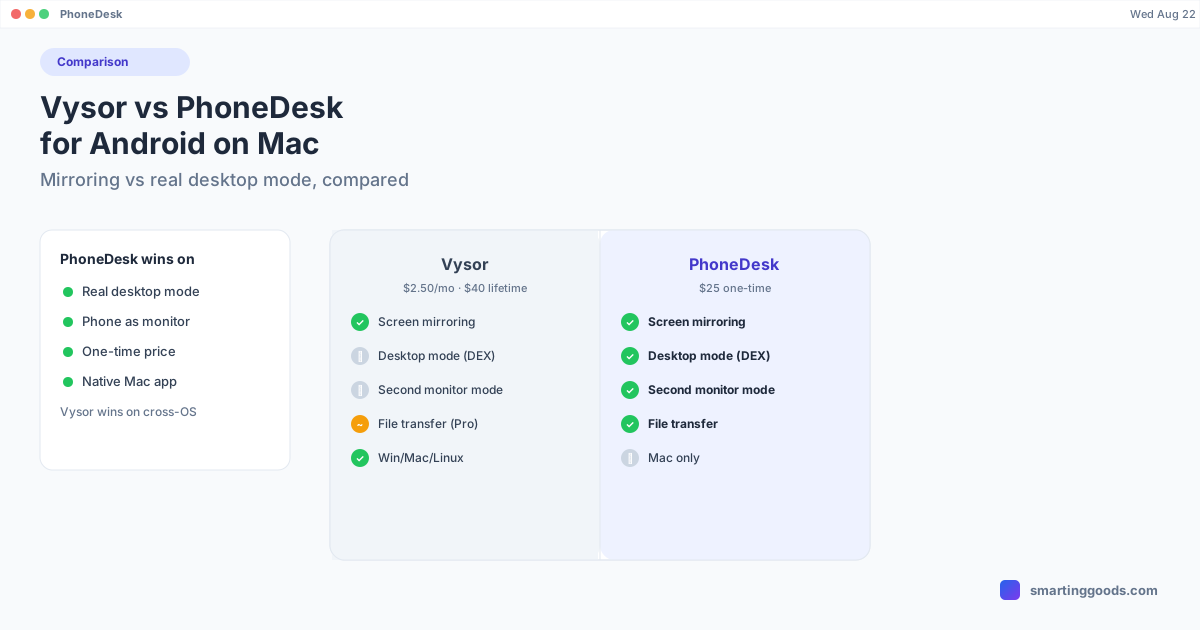
Screen mirroring. Both apps mirror your phone to your Mac. Vysor's free tier does this over USB; PhoneDesk mirrors over USB or Wi-Fi with no separate paid tier gating the connection type.
Desktop mode support. This is the biggest functional gap. Vysor mirrors your phone's normal portrait or landscape screen — it doesn't drive Samsung DEX or Pixel desktop mode. PhoneDesk specifically launches your phone's built-in desktop mode (confirmed on Samsung DEX / Galaxy Z Fold 6 and the Pixel 9 Pro) as a resizable macOS window, so you get a real desktop-style layout with a taskbar and resizable app windows, not just a mirrored phone screen in a box.
Phone as a second monitor. Vysor doesn't do this — it mirrors your phone's screen back to your Mac, not the other way around. PhoneDesk can flip the direction entirely: it creates a real macOS display and streams it to your phone, so the phone becomes an actual second monitor you can drag Mac windows onto.
File transfer. Vysor Pro supports drag-and-drop file transfer onto the mirrored window. PhoneDesk has a dedicated companion app on the phone — share from any app, pick files, or drag onto the desktop-mode window, and they land straight in your Mac's Downloads folder (shared text lands on your clipboard) without mounting anything over MTP.
Pricing model. Vysor Pro is a recurring subscription ($2.50/mo or $10/yr) or a $40 lifetime option. PhoneDesk is a flat $25 one-time purchase with a 14-day no-questions refund — cheaper than even Vysor's lifetime tier, with no ongoing charge.
Platform. Vysor runs as a Chrome extension or cross-platform desktop app (Windows/Mac/Linux) — solid if you bounce between operating systems. PhoneDesk is Mac-only, built specifically as a native macOS menu bar app, signed and notarized, with auto-updates through Sparkle.
Where Vysor Still Wins
Being fair here: if you're on Windows or Linux, or you need a tool that works identically across three operating systems, Vysor covers that ground and PhoneDesk doesn't — PhoneDesk is Mac-only by design. Vysor's free tier is also a real option if all you need is occasional USB mirroring and you don't mind ads and a capped resolution. And if you specifically need basic iOS mirroring alongside Android, Vysor supports both; PhoneDesk is Android-only.
How PhoneDesk Solves What Vysor Can't
If you're on a Mac and what you actually want is your phone's desktop mode running as a proper window — not a mirrored phone screen, but Samsung DEX or Pixel desktop mode with real window management — Vysor simply doesn't do that job. PhoneDesk was built around that specific gap: it auto-detects your phone the moment USB debugging is on, launches desktop mode with one click from the menu bar, and lets you switch to fully wireless with a QR code pairing straight from Android's own Wireless debugging screen.
The second-monitor mode goes further than anything in Vysor's feature set — instead of mirroring your phone to your Mac, PhoneDesk mirrors a real macOS display to your phone, so it becomes an arrangeable extra screen. And file transfer is handled by a purpose-built companion app rather than a drag-and-drop bolt-on.
Frequently Asked Questions
Q: Is Vysor free? A: Vysor has a free tier that works over USB with a capped resolution and ads. Wireless mode, fullscreen, drag-and-drop file transfer, and ad removal require Vysor Pro, which costs $2.50/month, $10/year, or $40 for a lifetime license.
Q: Does Vysor support Samsung DEX or Pixel desktop mode? A: No. Vysor mirrors your phone's standard screen — it doesn't launch or drive your phone's built-in desktop mode. PhoneDesk is built specifically to launch Samsung DEX and Pixel desktop mode as a real macOS window.
Q: Can Vysor turn my phone into a second monitor for my Mac? A: No, Vysor only mirrors in one direction — phone to computer. PhoneDesk can run in the other direction too, creating a real Mac display and streaming it to your phone so it becomes a usable second monitor.
Q: Which is cheaper, Vysor or PhoneDesk? A: PhoneDesk's $25 one-time price is less than Vysor Pro's $40 lifetime tier and has no recurring cost. Vysor's monthly ($2.50) and yearly ($10) plans are individually cheaper up front but keep billing indefinitely.
Q: Does PhoneDesk work on Windows? A: No, PhoneDesk is a native Mac app only. If you need a cross-platform tool, Vysor supports Windows, Mac, and Linux.
Bottom Line
Vysor is a capable, budget-friendly mirroring tool, especially if you need cross-platform support or basic iOS mirroring. But if you're on a Mac and want your phone's actual desktop mode running as a real window, your phone working as a second monitor, and simple phone-to-Mac file transfer — jobs Vysor's feature set doesn't cover — PhoneDesk is built for exactly that.
PhoneDesk is a $25 one-time license — no subscription, no ads, 14-day no-questions refund. See the full feature list →