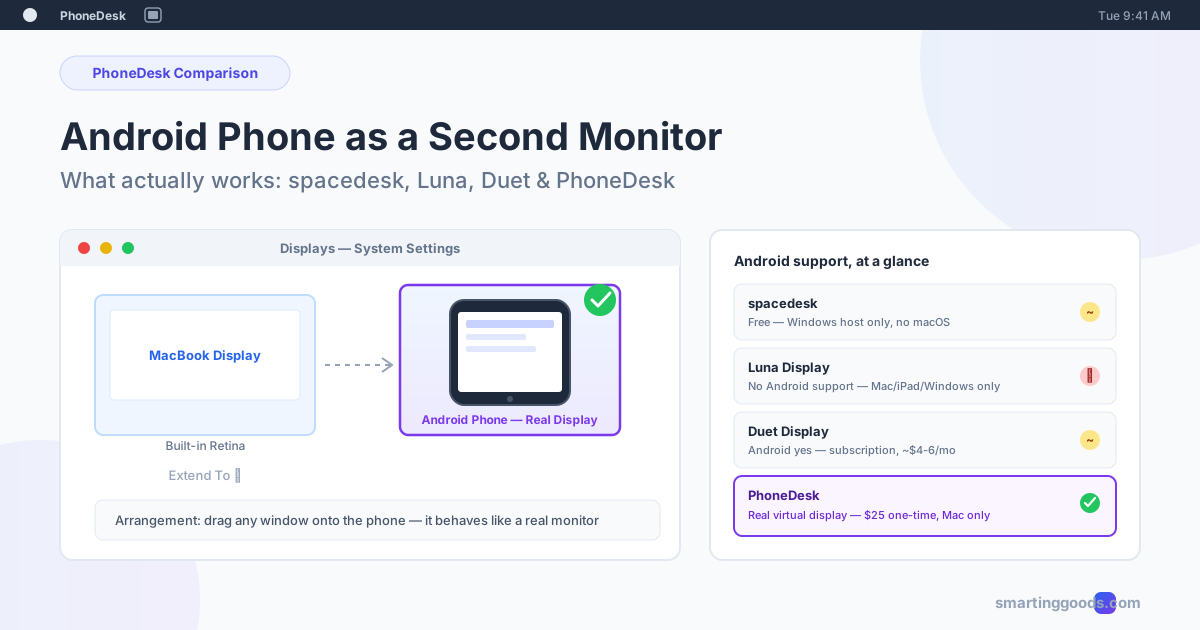
Android Phone as a Second Monitor: What Actually Works
Can you really use an Android phone as a second monitor? Here's the honest 2026 breakdown of spacedesk, Luna Display, Duet Display, and PhoneDesk — what's free, what's Windows-only, and what actually creates a real second display on a Mac.
Can You Use Your Android Phone as a Second Monitor? What Actually Works
If you've searched for a way to turn your Android phone into a second monitor, you've probably already hit the same wall: most of the results are about iPads. Luna Display, one of the top results for "second monitor from a phone," doesn't support Android at all — never has. Half the guides you'll find are actually about tablets, not phones. And the phone-specific options that do exist range from "free but fiddly" to "subscription that costs more than the phone update you were trying to avoid."
Here's the real landscape as of 2026: what supports Android, what's Windows-only, what's a genuine second display versus a mirror, and where a phone-sized screen is actually useful versus where you're better off saving your battery.
What "Phone as a Second Monitor" Actually Means
There are two very different things people mean by this phrase, and mixing them up is why so many searches lead to disappointment.
Mirroring shows a copy of a screen you already have — useful for presentations or watching your Mac's screen from across the room, but not extra desktop space.
Extending creates genuinely new screen real estate. Your computer treats the phone as an additional display: you can drag a window onto it, park a Slack window there, and the rest of your desktop behaves exactly like it would with a second physical monitor plugged in.
Most of the apps in this space market themselves as "second monitor" tools but are actually built around mirroring or a simplified extend mode that doesn't create a real OS-level display. That distinction matters — it decides whether your phone screen feels like an actual monitor or like a webcam pointed at your desktop.
spacedesk — Free, but It's a Windows Tool
spacedesk is the most recommended free option for Android, and it does work: install the Driver Console on a Windows PC, install the free spacedesk viewer app on your Android phone or tablet, connect over the same Wi-Fi network (or USB), and Windows Display Settings shows a new screen you can set to Extend.
The catch for Mac users: the spacedesk host driver only runs on Windows. A Mac can act as a spacedesk viewer for a Windows PC, but it cannot be the primary machine broadcasting a display. If your daily driver is a MacBook, spacedesk doesn't have a Mac-native answer — Windows has to be the source, not the destination.
Even on Windows, setup is DIY: driver install, matching your phone and PC to the same network, and troubleshooting if your router isolates devices from each other (common on guest networks and some mesh systems). It's free and it works, but "free" here means you're the IT department.
Luna Display — Great Product, Wrong Platform for Android Users
Luna Display shows up constantly in "phone as second monitor" searches because it's a well-known, well-reviewed way to turn an iPad into a Mac display. But it's worth saying plainly: Luna Display does not support Android, and never has. It works with macOS, iPadOS, and Windows 10+ as host platforms — Android isn't in that list, wired or wireless.
If you landed on Luna Display's site while searching for an Android solution, that's the mismatch — you found a good tool for the wrong phone. There's also a separate, unrelated product called Luna Screens (digital signage for Android TV) that occasionally muddies the search results further; it has nothing to do with turning a phone into a desktop display.
Duet Display — Android Support, but Subscription Pricing
Duet Display is one of the few tools here that genuinely supports Android as a second display for both Mac and Windows, over USB or Wi-Fi. It used to sell as a one-time purchase; that model is gone. Today Duet runs on subscription tiers — Duet Air, Studio, and Pro — starting around $4–6/month, billed monthly or annually.
For occasional use that's a small cost. For a screen you'd keep open daily, it adds up to $50–70/year for something that's ultimately extending a phone-sized screen. It's also, functionally, an extend/mirror app layered on top of your existing setup rather than a full virtual display integrated at the OS level — closer to "companion app" than "the Mac thinks this is a monitor."
Where PhoneDesk Is Different
PhoneDesk takes a different approach, and it only runs one direction from the others in this list: instead of your phone displaying a copy of something, your Mac creates an actual virtual display and streams it to your Android phone.
That distinction shows up immediately in System Settings → Displays — the phone appears as a real display, not a mirrored window or a remote-desktop session. You can drag any Mac window onto it, it holds its own resolution and position, and apps behave as if a second monitor is physically plugged in, because as far as macOS is concerned, one is.
A few things worth being upfront about, the same way we'd want a comparison post to be upfront with us:
- PhoneDesk is Mac-only. If your computer runs Windows, none of PhoneDesk's three features apply — spacedesk or Duet Display are your actual options there.
- It's built for phones, not just tablets. A lot of the search results in this space (and a lot of the review content) assume you're using a 10-inch tablet. PhoneDesk's phone-as-monitor mode is designed around a phone-sized screen doing phone-sized jobs — a persistent Slack or Discord panel, a stats dashboard, a chat window — not a full second desktop you're expected to work from all day.
- It's a $25 one-time license, not a subscription. No monthly fee, no yearly renewal to track.
Phone-as-monitor is one of three features in PhoneDesk's menu bar app — the same license also drives Samsung DEX or Pixel desktop mode as a real window on your Mac, and lets you send files and text from your phone to your Mac wirelessly, without MTP or a cable.
See how the phone-as-second-monitor feature works →
Frequently Asked Questions
Can I actually use my Android phone as a real second monitor for free? Yes, if your computer runs Windows — spacedesk is free and creates a real extended display. There's currently no equally solid free option for Mac users; the spacedesk host driver doesn't run on macOS.
Does Luna Display work with Android phones? No. Luna Display supports macOS, iPadOS, and Windows as host platforms, but has no Android support in any form, wired or wireless.
What's the difference between mirroring and extending my phone as a monitor? Mirroring copies whatever is already on one of your screens — you can watch it, but you can't put new windows there. Extending adds genuinely new screen space that your computer treats as a separate display, the same as plugging in a physical monitor.
Is Duet Display a one-time purchase? Not anymore. Duet Display moved from a one-time purchase model to subscription pricing (roughly $4–6/month depending on tier). It does support Android on both Mac and Windows.
Does PhoneDesk work on Windows? No — PhoneDesk is a macOS menu bar utility only. If you're on Windows, spacedesk or Duet Display are the relevant options in this comparison.
Is PhoneDesk a subscription? No. It's a $25 one-time license covering all three features — phone-as-second-monitor, Samsung DEX/Pixel desktop mode as a Mac window, and wireless file/text transfer from phone to Mac.
The Short Version
If you're on Windows, spacedesk is free and works — you just do the setup yourself. If you're on Android and specifically found Luna Display, that's not built for your phone; look at Duet Display or PhoneDesk instead. If you're on a Mac and want your Android phone to show up as an actual second display without a recurring subscription, that's the gap PhoneDesk fills.
PhoneDesk is a $25 one-time license — no subscription, no recurring fee. See the phone-as-second-monitor feature in detail → or view the full feature list →