Can You Play Fortnite or Call of Duty Mobile on Samsung DEX?
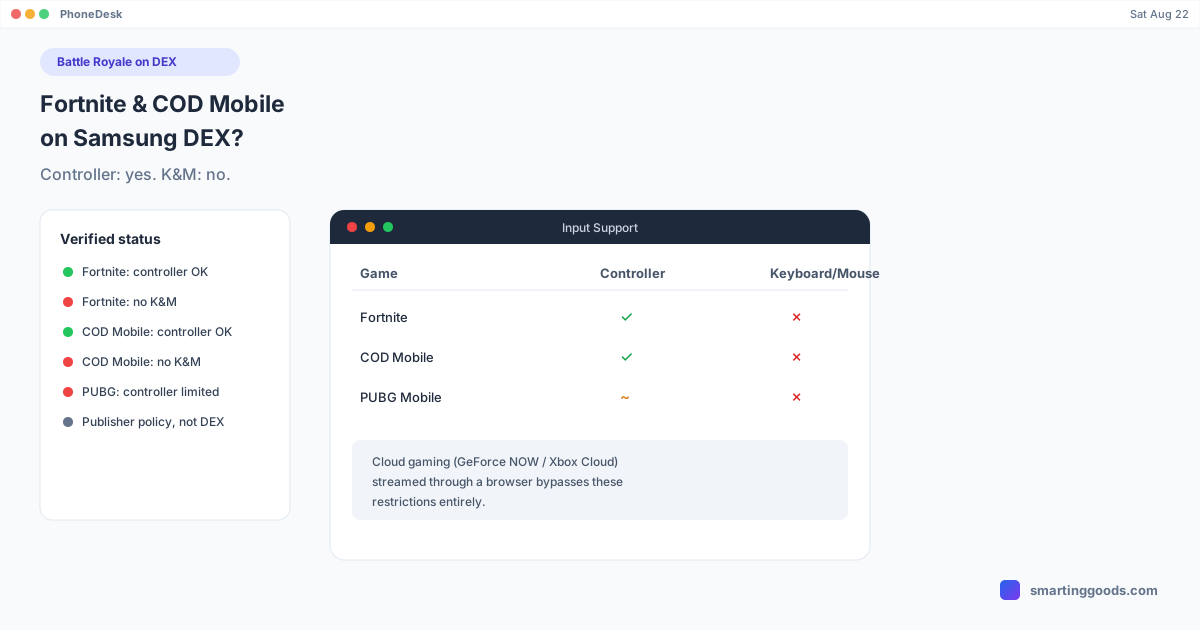
Fortnite and COD Mobile officially support Bluetooth controllers on DEX, but not keyboard and mouse. PUBG Mobile restricts even controller input. Here's the verified breakdown.
Can You Play Fortnite or Call of Duty Mobile on Samsung DEX?
Short answer: they'll launch in a DEX window, but keyboard and mouse won't do what you're hoping. Battle royale and competitive shooter mobile titles are the games people most want to play with a "real" desktop setup, and they're also the games with the most restricted external-input policies — for reasons that have nothing to do with Samsung DEX and everything to do with fairness between touchscreen and non-touchscreen players. Here's the actual, verified status for Fortnite, Call of Duty: Mobile, and PUBG Mobile as of 2026.
Fortnite on Samsung DEX
Fortnite officially supports Bluetooth controllers on mobile — that support works the same inside a DEX window as it does on the phone screen, since a paired Bluetooth controller operates at the OS level regardless of display mode. What Fortnite does not support, on mobile, in DEX or otherwise, is mouse and keyboard. This applies even when playing through streaming services like Xbox Cloud Gaming or GeForce NOW on a mobile device — the mobile version of Fortnite is locked to touch and controller input by design, to keep matchmaking fair against players who don't have a mouse and keyboard available.
Using an external controller is fine and won't put your account at risk. Using third-party software to fake keyboard/mouse input as touch events is a different story — that's not officially supported, and Epic's anti-cheat systems exist specifically to catch input spoofing.
Call of Duty: Mobile on Samsung DEX
Same pattern as Fortnite: Call of Duty: Mobile has confirmed, official Bluetooth controller support, which functions normally inside a DEX session. Keyboard and mouse are not supported on the Android or iOS app, period — this isn't a DEX limitation, it's the game itself not implementing that input path. You'll sometimes see PC emulators like Gameloop or BlueStacks advertise keyboard controls for COD Mobile, but that's a different setup entirely (running the Android app inside a PC-based emulator layer), not the mobile app running through DEX.
If your goal is genuinely competitive, precise input for a Call of Duty title, DEX with COD Mobile isn't the path — a controller is the sanctioned option, and that's it.
PUBG Mobile on Samsung DEX
PUBG Mobile is the strictest of the three. Unlike Fortnite and Call of Duty: Mobile, PUBG Mobile's publisher has deliberately excluded meaningful controller support since launch — a paired controller may register basic movement, but aiming, firing, and menu navigation largely don't work through a standard Bluetooth controller. This is a deliberate policy choice to preserve competitive parity for touchscreen players, not a technical limitation DEX could work around.
Keyboard and mouse input is technically permitted under PUBG Mobile's terms when it comes through standard, unmodified input hardware — but the anti-cheat system actively watches for input patterns that look automated or keymapped, and detected keymapper or emulator use routes you into matchmaking specifically for other flagged accounts rather than a ban outright. If you're using DEX with a legitimate keyboard and mouse and playing normally, that's within the rules; if you're relying on a third-party app to translate input into simulated touch, understand that Tencent's systems are built to detect exactly that pattern.
The Pattern Across All Three
None of this is about Samsung DEX being incapable — DEX faithfully passes through keyboard, mouse, and controller input to whatever's running in the window. The restriction lives entirely in the game's own input handling and each publisher's competitive-fairness policy. Battle royale titles in particular treat this as a matchmaking integrity issue, not a technical one, which is why the policies are so consistent and so unlikely to change.
If competitive shooters are the reason you wanted DEX gaming, the more productive path is cloud gaming through a browser — a full PC or console version of a shooter, streamed to a DEX window, comes with native keyboard/mouse support because the "game" is a real PC session, not a mobile app with input restrictions. See our GeForce NOW on Samsung DEX guide for that setup.
How PhoneDesk Fits In
PhoneDesk doesn't change any game's input policy — that's controlled entirely by the publisher, not the display mode or the app driving that display mode. What PhoneDesk does is take your phone's desktop mode (Samsung DEX or Pixel's native desktop mode) and put it in a real, resizable window on your Mac. If you're playing Fortnite or COD Mobile with a controller, or streaming a cloud gaming session through a browser, PhoneDesk gives you that desktop session as a proper window instead of requiring a separate monitor or dock setup. See the full feature list on the PhoneDesk homepage.
Frequently Asked Questions
Q: Will Fortnite or Call of Duty Mobile work with a keyboard and mouse on Samsung DEX? A: No. Neither game supports mouse and keyboard on mobile, in DEX or otherwise — this is a publisher-level restriction, not a DEX limitation. Both support Bluetooth controllers, which work normally in a DEX window.
Q: Can I use a controller with PUBG Mobile on DEX? A: Only partially. PUBG Mobile deliberately limits controller functionality to basic movement — aiming, firing, and menus largely don't work with a standard Bluetooth controller, by the publisher's design.
Q: Will I get banned for using DEX with these games? A: Playing normally with an officially supported controller carries no ban risk. Using third-party software to spoof keyboard/mouse input as touch is against these games' terms and can trigger anti-cheat detection or matchmaking restrictions.
Q: What's the best way to play a real shooter with keyboard and mouse on DEX? A: Cloud gaming through a browser — GeForce NOW or Xbox Cloud Gaming stream an actual PC or console session, which supports keyboard and mouse natively since it isn't the restricted mobile app.
Q: Does PhoneDesk unlock keyboard/mouse support for these games? A: No — PhoneDesk puts your phone's existing desktop mode in a window on your Mac. It doesn't change what any game's publisher allows for input; that's set entirely by the game itself.
Bottom Line
Fortnite and Call of Duty: Mobile support controllers but not keyboard/mouse, by design. PUBG Mobile restricts even controller input meaningfully. None of this is a DEX shortcoming — it's deliberate competitive-fairness policy from each publisher, and it's consistent enough that it's unlikely to change. If precise keyboard/mouse input for real shooters matters to you, cloud gaming through a browser is the path that actually works.
Want your phone's desktop mode as a real window on your Mac regardless of which games you play? See how PhoneDesk works. $25 one-time, no subscription, 14-day refund if it's not for you.