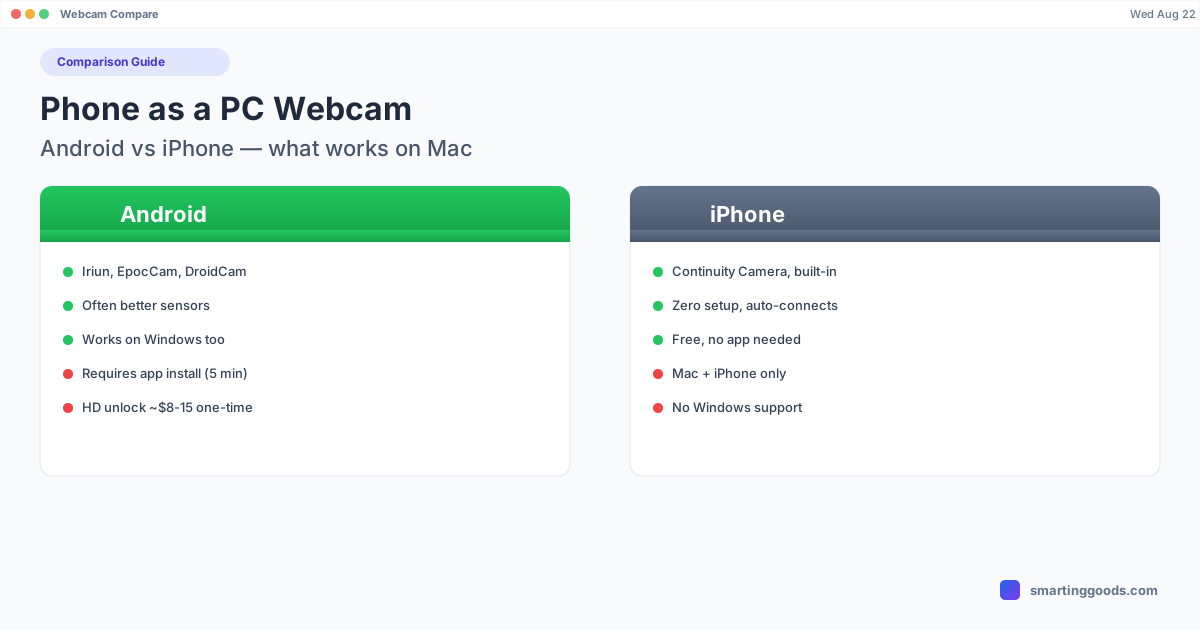
Phone as a PC Webcam: Android vs iPhone on Mac
iPhone has Continuity Camera built in. Android doesn't — but it still works, and sometimes looks better. Here's the honest comparison.
Phone as a PC Webcam: Android vs iPhone, What Actually Works on Mac
Search "use my phone as a webcam" and you'll get a pile of results that quietly assume you own an iPhone. Apple built Continuity Camera directly into macOS — no app to install, no account to create, it just works over Wi-Fi or a Lightning/USB-C cable the moment your iPhone is nearby. Android has no equivalent built into the OS. If you're an Android user, that gap is exactly why the search results feel like they're written for someone else.
The good news: Android absolutely can be used as a Mac webcam, and in some ways the ecosystem gives you more choice than Apple's one-button solution. Here's the honest comparison — what's built-in vs what needs an app, what costs money, and which platform actually gives you a better result.
iPhone: Continuity Camera Is Built Into macOS
If you have an iPhone (XR or later) and a Mac running macOS Ventura or newer, Continuity Camera requires almost no setup. Both devices need to be signed into the same Apple ID with Wi-Fi and Bluetooth on; bring the iPhone near the Mac, and it appears automatically as a camera option in FaceTime, Zoom, Meet, and anywhere else macOS lists cameras. Mount it with a $20 Belkin clip (the official accessory) or any MagSafe-compatible mount, and you get Desk View, Center Stage, and Portrait mode — automatically, no app, no account beyond iCloud.
That's a genuinely strong, zero-friction experience — it's the reason so much of the "phone as webcam" content assumes iPhone. But it's a closed system: it only works Apple-to-Apple, and if you're not carrying an iPhone, none of it applies to you.
Android: No Built-In Equivalent, but Real Apps That Work
Android has nothing OS-level that mirrors Continuity Camera — there's no first-party "just walk up and it connects" feature from Google. What Android has instead is a small ecosystem of third-party apps that do the same underlying job: capture the phone's camera, stream it to a Mac client app, and register a virtual camera driver that Zoom/Meet/OBS can select.
The three worth knowing:
- Iriun Webcam — free tier with watermark, Wi-Fi or USB, cross-platform (works the same way on Windows and Linux, useful if you're not Mac-exclusive). Paid unlock removes the watermark and resolution cap for roughly $8–15 one time.
- EpocCam (Elgato) — free tier caps at 480p; EpocCam HD (~$8 one-time) unlocks 720p. Cleanest UI of the group, made by a company that also makes actual capture hardware.
- DroidCam — widest device compatibility, including older Android phones. Free tier at 480p; DroidCam OBS unlocks HD and direct OBS integration for a small one-time fee.
None of these are pre-installed. Each requires an app on the phone, a companion app on the Mac, and — depending on the app — either the same Wi-Fi network or a USB cable. That's real setup friction compared to Continuity Camera's "just appears." But it's a five-minute setup, not a technical project, and it's done once.
Which Actually Produces a Better Picture?
This is where it gets interesting, and where Android can genuinely win: sensor quality varies enormously by phone, and a lot of Android flagships (Galaxy S-series, Pixel Pro line) have larger, better sensors than an iPhone's front camera — Continuity Camera typically uses the iPhone's rear camera for the best quality, which is a smart design choice, but the point stands that Android phone owners aren't working with an inferior camera, just a less-integrated setup process.
In practice, image quality comes down to three things regardless of platform: sensor size, lighting, and app processing — not brand. A recent Android flagship using EpocCam in good light will look better than an older iPhone using Continuity Camera in bad light. The app matters less than the phone and the room.
Cost Comparison
| iPhone (Continuity Camera) | Android (third-party apps) | |
|---|---|---|
| Software cost | Free (built into macOS) | Free tier available, HD unlock ~$8–15 one-time |
| Setup | Automatic, same Apple ID | Install app on phone + Mac, connect once |
| Mount | Official Belkin clip ~$20 (optional) | Any generic phone stand/clip |
| Cross-platform (Windows too) | No — Mac only | Yes — most Android webcam apps also work on Windows |
Android's total cost is comparable or cheaper once you factor in that Continuity Camera's convenience is Mac-and-iPhone-only, while most Android webcam apps also work if you ever use a Windows machine.
What This Doesn't Cover: Screen, Not Camera
It's worth being clear about scope here, because these categories get conflated online: everything above is about streaming your phone's camera into a video call. It has nothing to do with tools that put your phone's screen on your computer — Samsung DEX, Pixel desktop mode, or using a phone as a second monitor are a completely different use case (mirroring or extending a display, not a camera feed), and the apps that do one don't do the other.
If you're an Android user who's also looked into getting your phone's actual screen onto your Mac — as a resizable desktop-mode window, a second monitor, or a cable-free way to send files over — that's a separate tool. PhoneDesk does that side of things (not webcam) for $25 one-time, no subscription. See the Android desktop mode explainer if that's actually what you were looking for.
Frequently Asked Questions
Q: Can an iPhone user do anything an Android user can't for webcam use? A: Mainly the zero-setup convenience — Continuity Camera works without installing anything. Android users get comparable (sometimes better) image quality through third-party apps, but need a one-time install and setup step that iPhone users skip entirely.
Q: Does Continuity Camera work with Android phones? A: No — it's an Apple-only feature tied to iCloud and Apple ID, and only works between an iPhone and a Mac. Android phones use third-party apps like Iriun, EpocCam, or DroidCam instead.
Q: Is an Android phone as a webcam actually as good as an iPhone's Continuity Camera? A: Image quality depends more on the specific phone's sensor and the lighting than on the platform. A recent Android flagship with a good webcam app can match or beat an iPhone in image quality — the iPhone's advantage is setup convenience, not necessarily picture quality.
Q: Does PhoneDesk work as a webcam app for either Android or iPhone? A: No — PhoneDesk is Android-only and handles your phone's screen (desktop mode, second monitor, file transfer), not its camera. For webcam use on Android, use Iriun, EpocCam, or DroidCam instead.
Bottom Line
iPhone users get a zero-setup webcam experience because Apple built it into macOS. Android users don't get that convenience, but a five-minute setup with Iriun, EpocCam, or DroidCam gets to the same result — and depending on the phone, often a better picture. Neither platform has a meaningful, permanent advantage; it's a tradeoff between "instant" and "five minutes once."
If you're on Android and the thing you actually wanted was your phone's screen on your Mac — not its camera — see what PhoneDesk does instead →. $25 one-time, no subscription, 14-day refund if it's not what you needed.