PhoneDesk System Requirements: What Mac and Android You Need
A straight reference on what Mac and Android setup PhoneDesk actually needs — macOS version, Android connection requirements, and which phones have confirmed desktop-mode support.
PhoneDesk System Requirements: What Mac and Android You Need
Before buying anything, it's worth knowing exactly what PhoneDesk requires on both sides of the connection. This is a plain reference — no marketing language, just what's actually needed.
Mac Requirements
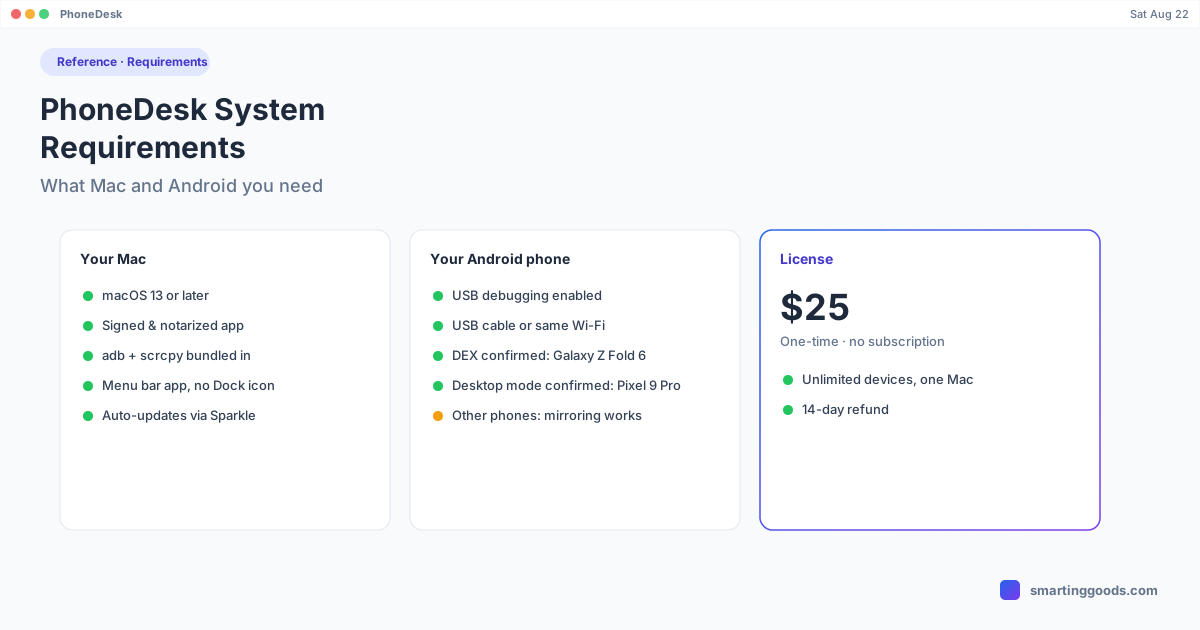
- macOS 13 or later. This is the minimum operating system version PhoneDesk supports.
- PhoneDesk is a signed and notarized app distributed through Apple's standard notarization process — no Gatekeeper workarounds or "open anyway" security dialogs needed to install it.
- adb and scrcpy are bundled inside the app. You don't need to separately install Android platform tools, Homebrew packages, or anything else — PhoneDesk ships with what it needs to talk to your phone.
- It runs as a menu bar utility — no Dock icon, no separate launcher window cluttering your app switcher.
- Auto-updates through Sparkle, Apple's standard third-party update framework, so new versions arrive automatically rather than requiring a manual reinstall.
Android Requirements
- USB debugging must be enabled in Developer options — this is required for PhoneDesk (or any adb-based tool) to detect and connect to the phone at all. Here's how to turn it on if you haven't already.
- A connection path: either a USB cable, or the phone and Mac on the same Wi-Fi network for wireless pairing via QR code or pairing code.
- Once USB debugging is on, PhoneDesk auto-detects the phone — name, resolution, and Wi-Fi port are picked up without manual configuration.
Desktop Mode: Confirmed vs. General Support
Desktop Mode specifically — the feature that drives Samsung DEX or Pixel's built-in desktop mode as a window on your Mac — has been confirmed working on the Galaxy Z Fold 6 (Samsung DEX) and the Pixel 9 Pro (Pixel's native desktop mode). These are the two devices PhoneDesk's own documentation and demo video specifically call out as verified.
The broader claim is that any Android phone with "desk-eligible" desktop mode built in should work the same way, since PhoneDesk is driving the phone's own native desktop mode rather than building a custom one — but Galaxy Z Fold 6 and Pixel 9 Pro are the two devices with confirmed, verified support as of this writing.
Other Android phones without native desktop mode — meaning most phones that don't have DEX or Pixel-style desktop mode built in — still connect fine for screen mirroring, even though they won't have a true windowed desktop session, since that specific feature depends on the phone's own OS supporting it.
Second-Monitor Mode and File Transfer
The phone-as-second-monitor feature (PhoneDesk creates a real macOS display and streams it to the phone) and the file-transfer feature (share sheet to Mac, drag-and-drop, clipboard sync) both work over the same USB debugging connection described above — no additional requirements beyond what's listed here.
What's Not Required
- No separate Android app store install is required to get started — the phone connects directly via adb once USB debugging is on. (A companion app is used for picking files to send, per PhoneDesk's file-transfer feature.)
- No account creation, login, or cloud service to set up.
- No drivers to install on the Mac — adb and scrcpy come bundled.
Frequently Asked Questions
Q: What's the minimum macOS version for PhoneDesk? A: macOS 13. Earlier versions aren't supported.
Q: Does my phone need root access? A: No, not for standard Desktop Mode or Mirror Screen. The invisible virtual-display variant (which keeps the phone screen off during a session) needs one root device property flipped — that's a specific, separate feature, not a general requirement.
Q: Will PhoneDesk work with any Android phone? A: Screen mirroring and file transfer work broadly with any phone that has USB debugging enabled. Full Desktop Mode (DEX/Pixel-style windowed desktop) is confirmed on the Galaxy Z Fold 6 and Pixel 9 Pro specifically, and should extend to other desk-eligible phones, though those two are the verified cases.
Q: Do I need a Samsung or Google phone specifically? A: For the Desktop Mode feature to give you a full windowed desktop session, yes — it depends on the phone having native desktop mode (DEX or Pixel's). For mirroring and file transfer, no — any phone with USB debugging enabled connects.
Check Your Setup, Then Get PhoneDesk
If your Mac is on macOS 13+ and your Android phone can have USB debugging turned on, you're set. See the full feature list and demo video →
PhoneDesk is a $25 one-time license — no subscription, 14-day no-questions refund.