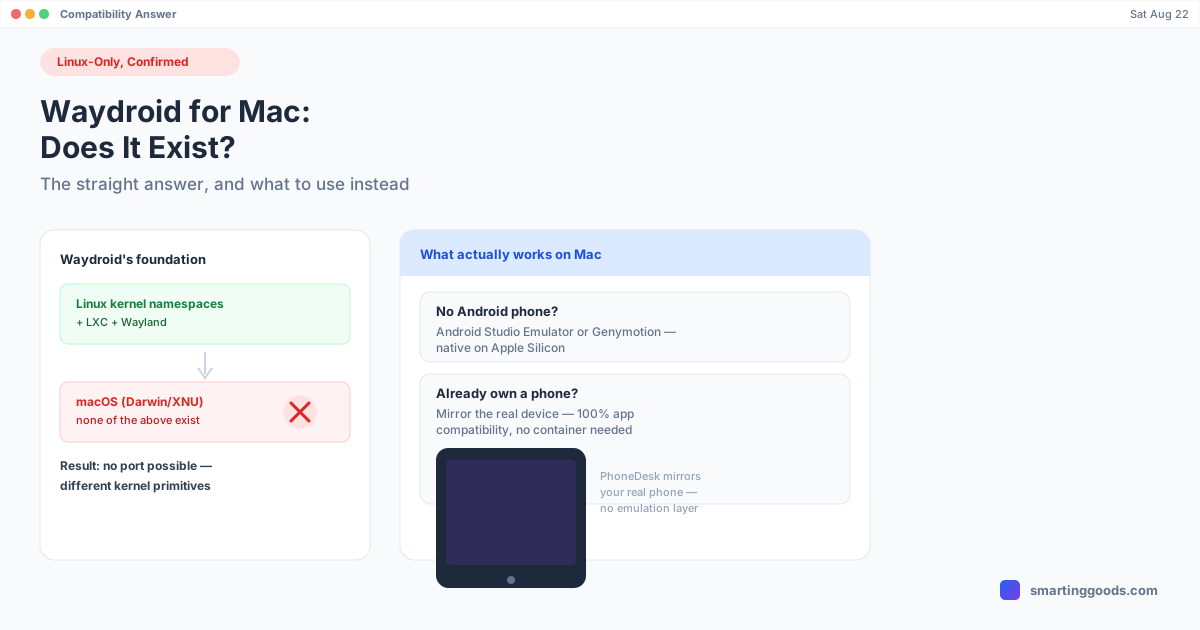
Waydroid for Mac: Does It Exist, and What Instead
Waydroid can't run on macOS — it depends on Linux-only kernel namespaces, LXC, and Wayland. Here's the technical reason why, and what to use on a Mac instead.
Waydroid for Mac: Does It Exist, and What to Use Instead
Short answer, right up front, because this is a "does this exist" question and you shouldn't have to read six paragraphs to get to it: no, Waydroid does not run on Mac, and it never will in its current form. Not "hasn't been ported yet" — architecturally can't be, for reasons baked into how it works. Here's why, and what actually gets you Android apps on a Mac instead.
What Waydroid Actually Is
Waydroid is a free, open-source project that runs a full Android system inside a container on Linux, using Linux namespaces (user, PID, mount, network, and others) and LXC to give Android direct access to the host's hardware without full virtualization. That's what makes it fast — it's not emulating an ARM or x86 Android device inside a virtual machine the way Bluestacks or an Android Studio emulator does. It's running Android as a container that shares the Linux kernel with the host, which is why performance on Linux is close to native.
The "Way" in Waydroid refers to Wayland, the Linux display server protocol Waydroid renders through. The whole project is built directly on top of Linux-specific kernel features and a Linux-specific display server.
Why Waydroid Can't Run on macOS
This isn't a "nobody's gotten around to it yet" gap — it's a structural mismatch:
- Linux namespaces don't exist on macOS. Namespaces are a Linux kernel feature. macOS (Darwin/XNU) has no equivalent primitive that LXC-style containers can hook into. There's no container runtime on macOS that gives a guest OS this kind of low-level, near-native access to host hardware.
- LXC is Linux-only. LXC (Linux Containers) is, as the name says, a Linux technology. It has no macOS counterpart — Docker Desktop on Mac, for comparison, actually runs a hidden Linux VM under the hood specifically because macOS has no native container layer to use.
- Wayland doesn't run on macOS. macOS uses its own display architecture entirely separate from X11/Wayland. Waydroid renders through Wayland compositors; there's nothing on macOS for it to render into.
Put together, Waydroid isn't "an Android emulator that happens to prefer Linux" — it's a piece of Linux infrastructure that uses Android as its payload. Porting it to macOS wouldn't be a build flag change; it would mean rebuilding its entire foundation on top of a kernel and display system that don't offer the same primitives. That's not on any roadmap, and nothing in the project's architecture suggests it's coming.
"But I Found a Waydroid-for-Mac Guide/Tool"
If you've seen something claiming to run Waydroid on macOS, it's doing one of a few things, and it's worth knowing which before you sink an afternoon into it:
- Running Waydroid inside a Linux VM on your Mac (UTM, VMware Fusion, Parallels, etc.). This technically "works" in the sense that Waydroid runs — but it's running inside virtualized Linux, not on macOS itself. You've added a full Linux VM as a middle layer, which eats into the performance advantage that makes Waydroid worth using in the first place, and Apple Silicon adds another wrinkle since you'd need an ARM Linux distro and Android build compatible with it.
- Confusing Waydroid with an actual cross-platform emulator. Some roundup articles lump Waydroid into "best Android emulators" lists alongside Bluestacks and Genymotion without flagging that it's fundamentally different technology with a hard platform restriction. Worth double-checking any source that lists it as a normal cross-platform option.
If you're set on the "run Android in a Linux container" architecture specifically, a Linux VM on your Mac is the only way to get Waydroid running at all — but at that point you're managing a full virtualized OS just to get to Android, which is a lot of overhead for most people's actual goal (running an app or two).
What to Actually Use on a Mac
Depending on what you're trying to do, there are two real paths:
No Android phone, want to run Android apps anyway — use a real emulator. Android Studio's built-in emulator now ships native Apple Silicon system images, so it runs as ARM code on M-series Macs rather than through translation — genuinely fast for a free tool, though it comes bundled inside a developer-oriented app. Genymotion is a more polished alternative (VirtualBox-based) aimed at QA and developers, with a free personal tier. Both are legitimate, Mac-compatible ways to run Android apps without owning a phone — unlike Waydroid, they're built to be cross-platform from the ground up.
Already own an Android phone — skip emulation, use the real device. An emulator or container is still an approximation of Android; a physical phone is the real thing, with 100% app compatibility and no risk of banking apps or anti-cheat systems flagging you as an emulated environment. If you own an Android phone, projecting its actual screen onto your Mac sidesteps the whole emulator/container question.
How PhoneDesk Fits In
PhoneDesk is a macOS menu bar app for that second path — it doesn't try to emulate or containerize Android at all. Using adb and scrcpy under the hood, it connects to a real Android phone you own over USB or Wi-Fi and puts its screen in a resizable window on your Mac. Every app runs exactly as it does on the phone, because it is the phone — no namespace tricks, no kernel-level container, no compatibility gaps to work around.
Beyond mirroring, it can drive Samsung DEX or Pixel desktop mode as a proper Mac window on supported phones, flip direction and turn your phone into a real second monitor for your Mac, and send files or text from phone to Mac wirelessly through the native Android share sheet.
To be clear about what PhoneDesk is not: it's not an Android emulator and it requires an Android phone to already be in your hand. If you don't own one and just want to try an app, Android Studio's emulator or Genymotion are the right call, not PhoneDesk. But if the phone already exists and you just wanted its apps on a bigger screen, this is the more direct route than chasing a Waydroid workaround that was never going to run cleanly on macOS anyway. See the full feature list →
Frequently Asked Questions
Q: Is there any official Waydroid support for macOS planned? A: No. Waydroid depends on Linux namespaces, LXC, and Wayland — none of which exist on macOS — so there's no version of "Waydroid for Mac" on the horizon. It would require rebuilding the project on an entirely different foundation, not a simple port.
Q: Can I run Waydroid on a Mac using a virtual machine? A: Yes, technically — install a Linux VM (via UTM, Parallels, or VMware Fusion) and run Waydroid inside it. You'll get Waydroid running, but you lose most of its near-native performance advantage since it's now inside a virtualized guest OS rather than running directly against the host kernel.
Q: What's the difference between Waydroid and a normal Android emulator like Bluestacks? A: Waydroid runs Android as a lightweight Linux container sharing the host kernel (fast, but Linux-only). Bluestacks and similar tools run Android inside a more traditional virtualized/emulated environment, which is heavier but works across Windows and (with caveats) Mac. They solve the same end goal through very different, non-interchangeable architectures.
Q: I own an Android phone — do I even need an emulator? A: No. If you already have a physical Android phone, mirroring or driving its actual screen from your Mac gives you full app compatibility without any emulator or container involved. Emulators exist mainly for people who don't have a physical device or need to test across many device profiles.
Q: Does PhoneDesk emulate Android like Waydroid does? A: No. PhoneDesk doesn't emulate or containerize anything — it connects to a real Android phone over USB or Wi-Fi and shows its actual screen in a Mac window. It requires an existing Android phone; it's not a substitute for an emulator if you don't have one.
Bottom Line
Waydroid for Mac doesn't exist and isn't coming — it's built on Linux-only kernel features (namespaces, LXC) and the Wayland display server, none of which macOS has an equivalent for. Running it inside a Linux VM technically works but defeats much of its purpose. If you need Android apps on a Mac without owning a phone, Android Studio's emulator or Genymotion are the legitimate, native-on-Apple-Silicon options. If you already own an Android phone, you don't need an emulator at all.
PhoneDesk is a $25 one-time license — no subscription — with a 14-day no-questions refund. See the full feature list → or read the deeper breakdown of emulator vs. real-phone options.