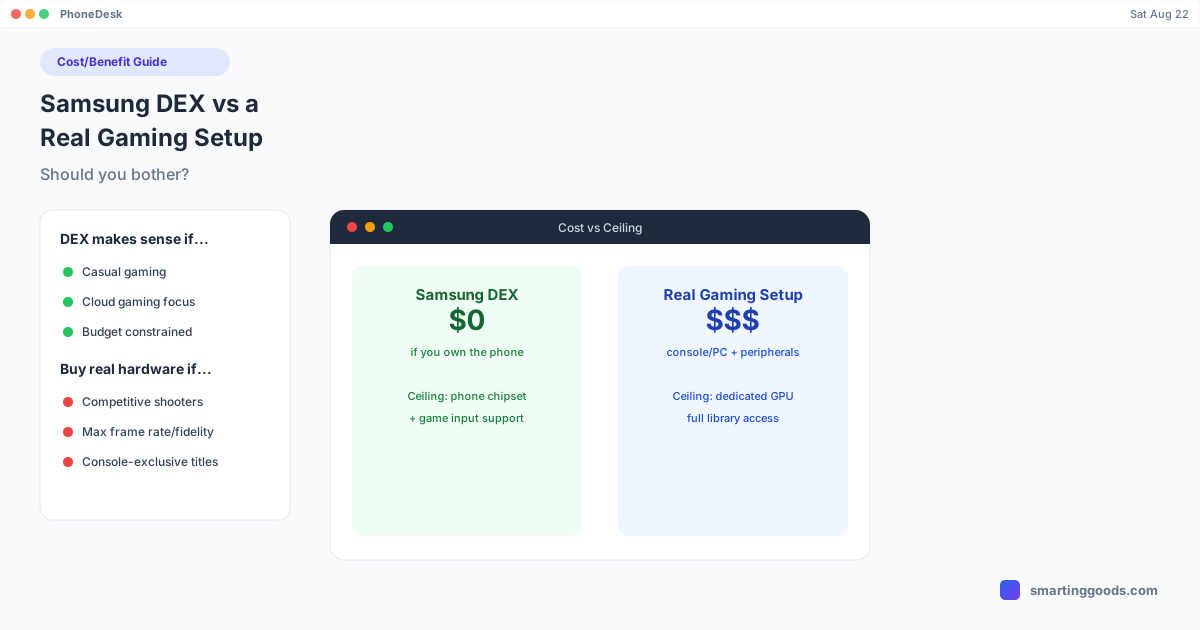
Samsung DEX vs a Real Gaming Setup: Should You Bother?
An honest cost/benefit breakdown of when Samsung DEX gaming makes sense (casual, cloud gaming, budget-limited) and when you should just buy real hardware.
Samsung DEX vs a Real Gaming Setup: Should You Bother?
You already own the phone. A dock or a decent USB-C cable is cheap. So why not just use Samsung DEX as your gaming setup and skip buying a console or a gaming PC? For some people, that's a genuinely reasonable call. For others, it's going to be a frustrating detour that ends with them buying the real hardware anyway. Here's how to tell which one you are before you spend time setting it up.
What DEX Gaming Actually Costs You
Nothing, financially, if you already have the phone and a cable or dock. That's the entire appeal, and it's a real one — there's no console price tag, no GPU purchase, no monthly hardware payment plan. If you're testing whether desktop-style gaming even interests you before committing money to it, DEX is close to free to try.
The cost instead shows up as compatibility friction and ceiling. Your phone's chipset is the performance ceiling for any native game, with no upgrade path short of buying a new phone. Most touch-first mobile games don't support keyboard and mouse at all, and several of the biggest titles — Fortnite, Call of Duty: Mobile, PUBG Mobile — restrict input further for competitive-fairness reasons that have nothing to do with your hardware. We cover the specifics in Samsung DEX Gaming: What Actually Works and Fortnite/COD Mobile on DEX.
When DEX Gaming Makes Sense
You're casual about it. If gaming is something you do occasionally, not a hobby you've built a setup around, DEX removes the barrier to trying a bigger-screen, keyboard-adjacent experience without any purchase.
You want cloud gaming specifically. This is the strongest case, full stop. Services like GeForce NOW stream real PC games with full keyboard/mouse support, and DEX just provides the desktop-style window to play them in. Here the "real gaming setup" comparison mostly evaporates — you're getting an actual PC game either way, whether it's rendered locally or streamed. See our GeForce NOW on Samsung DEX guide for the real setup and its bandwidth requirements.
You already have the hardware and just want a bigger view. If your goal is genuinely "I want to see my phone's screen bigger while I play a game I already enjoy on touch," and mouse/keyboard input isn't required, DEX (or PhoneDesk's window-based approach) does that without any new spending.
You don't have space or budget for a dedicated setup. Not everyone has room for a desk with a monitor, console, and controller collection. Using hardware you already carry in your pocket is a legitimate constraint-driven choice, not a downgrade to feel bad about.
When You Should Just Buy the Real Thing
You want competitive, precise input for shooters. If the appeal is aiming precisely with a mouse in a battle royale title, DEX can't deliver that for the mobile versions of Fortnite, COD Mobile, or PUBG Mobile — those games restrict or exclude that input path by design, not because of anything DEX does or doesn't support.
You care about frame rate and visual fidelity. Native mobile gaming is capped by your phone's chipset, and even cloud gaming through DEX has documented ceilings — no 120fps in Android Desktop Mode, 1440p gated behind a premium membership tier. A dedicated gaming PC or console doesn't carry those specific caps.
You're chasing a specific library. A huge share of PC and console games simply aren't available as native Android titles, and cloud gaming libraries, while large, aren't complete substitutes. If there's a specific non-mobile game you want, DEX isn't the path to it unless it happens to be on a cloud gaming service.
You game for hours at a stretch. Phones get warm, battery becomes a factor even when plugged in and charging simultaneously, and ergonomics degrade over a long session in ways a proper gaming chair and monitor setup don't. Short sessions are fine; marathon sessions expose the compromises.
The Honest Middle Ground
For most people asking this question, the real answer isn't "DEX gaming" versus "buy a gaming PC" as a binary. It's: use DEX (or PhoneDesk) for cloud gaming and casual sessions where it genuinely performs well, and accept that competitive native mobile titles and anything demanding real GPU horsepower need dedicated hardware regardless of what display mode you're using. Trying to force DEX into being your only gaming setup for everything is where the frustration comes from — treating it as one more tool for the specific things it's good at is where it earns its keep.
How PhoneDesk Fits In
If you land on "casual gaming or cloud gaming through DEX is worth it for me," PhoneDesk is what makes that setup less annoying day to day. Instead of a dock tethered to a TV or a separate monitor dedicated to your phone, PhoneDesk drives your phone's desktop mode — Samsung DEX or Pixel's native desktop mode — as a real, resizable window directly on your Mac, over USB or Wi-Fi. It doesn't change what games or services support external input; it just removes the extra hardware requirement for having a proper window to use them in. Full details on the PhoneDesk homepage.
Frequently Asked Questions
Q: Is Samsung DEX gaming actually good, or is it overhyped? A: Both, depending on what you're playing. Cloud gaming through DEX is genuinely solid. Native mobile gaming is limited by your phone's own hardware and by which games support external input at all — most don't.
Q: Will DEX save me money over buying a gaming console? A: If you already own the phone and just want casual or cloud gaming, yes — there's no new hardware cost. If you want competitive shooters or console-exclusive titles, DEX can't substitute for that hardware regardless of cost.
Q: What's the single best gaming use case for DEX? A: Cloud gaming through a browser, like GeForce NOW. It's the one scenario with full, officially documented keyboard/mouse support and no game-by-game compatibility guessing.
Q: Does PhoneDesk help with any of this? A: PhoneDesk puts your phone's desktop mode in a window on your Mac, which is useful if you've decided DEX gaming (especially cloud gaming) is worth doing. It doesn't change game compatibility or add gaming performance — that's set by the phone's hardware and each game's own policies.
Bottom Line
DEX gaming is worth setting up if you're casual, curious, budget-constrained, or specifically interested in cloud gaming. It's not worth forcing if you want competitive shooter precision, top frame rates, or a specific non-mobile game library — those need dedicated hardware no display mode can substitute for. Know which camp you're in before you spend an evening troubleshooting input that was never going to work.
If cloud gaming or casual DEX use is the plan, see how PhoneDesk works — $25 one-time, no subscription, 14-day refund if it's not for you.